> ## Documentation Index
> Fetch the complete documentation index at: https://sdk.cerebras.ai/llms.txt
> Use this file to discover all available pages before exploring further.
# GEMV Tutorial 6: Routes and Fabric DSDs
> Use fabric DSDs and routes to distribute a GEMV computation across multiple PEs and pass data between them via the WSE fabric.
Now that we’ve introduced multiple PEs into our program,
instead of duplicating our GEMV problem between them,
let’s actually distribute the work for computing a single GEMV.
## Learning Objectives
After completing this tutorial, you should know how to:
* Use fabric DSDs `fabout_dsd` and `fabin_dsd` to send and receive data between PEs
* Utilize asynchronous builtin operations on fabric DSDs
* Define a local task which is activated by a `local_task_id`
## Example Overview
Our program will run on two processing elements (PE).
We will demonstrate the program with a simulated fabric
consisting of a 9 x 3 block of PEs.
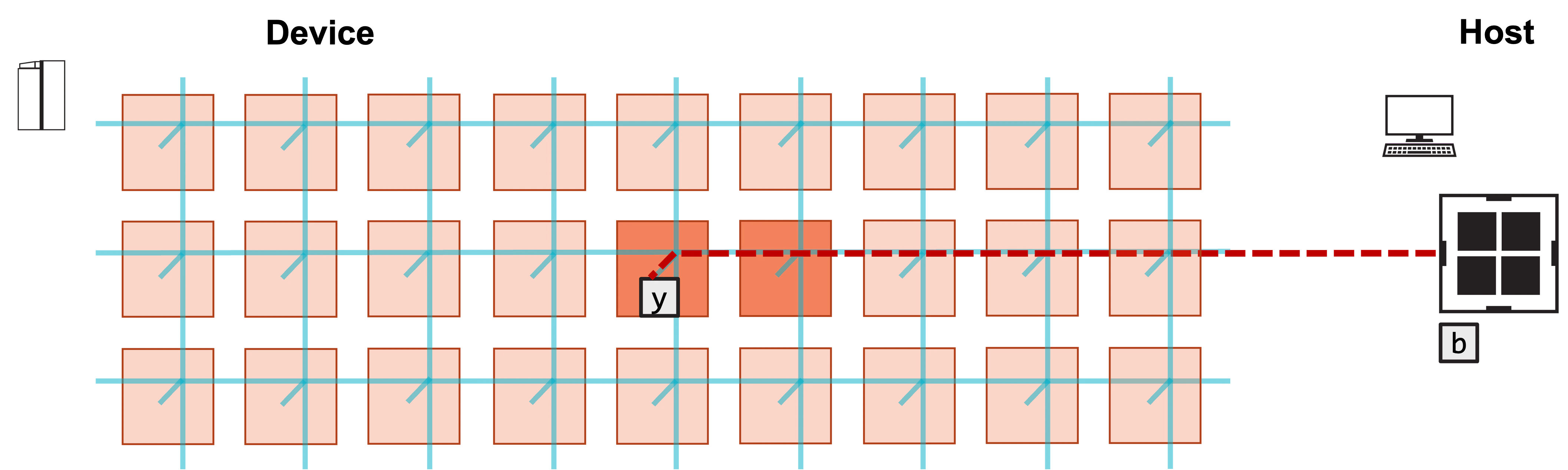
The program will first copy `b` into the left PE’s `y` array.
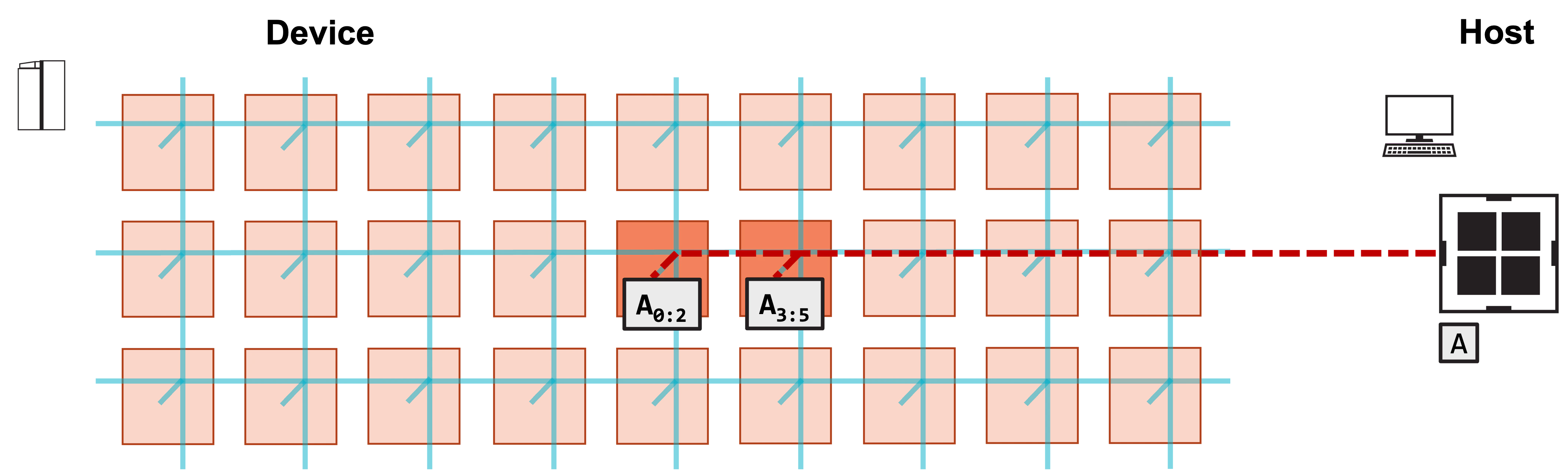
Then, it will copy the left half of `A`’s columns into the left PE,
and the right half of `A`’s columns into the right PE.
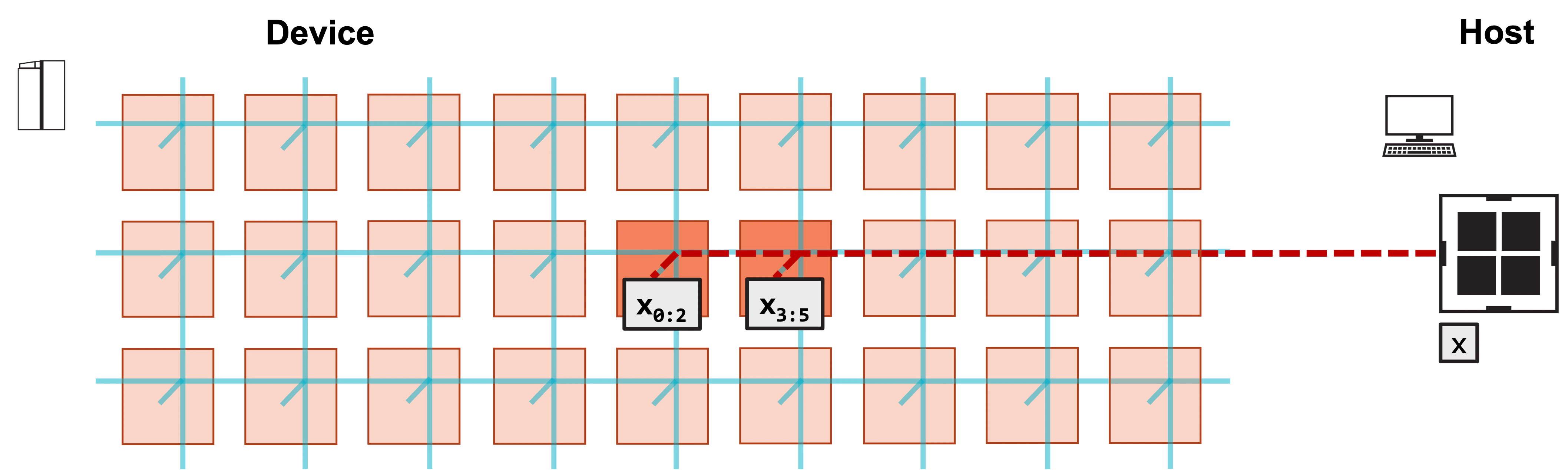
Similarly, it will copy the first `N/2` elements of `x`
into the left PE, and the last `N/2` elements of `x` into the right PE.
Each PE will then compute `A*x` for its local pieces of `A` and `x`.
Thus, both PEs perform a matrix-vector product for an `M x N/2` matrix.
The PEs will increment their local `y` arrays by this result.
The left PE then sends its `y` array to the right PE, and the right PE
increments its local `y` array by the received values.
Because the left `y` array contained the contribution from `b`,
the final summed `y` on the right PE is our GEMV result.
The host then copies `y` off of the right PE.
### Problem Steps
Visually, this program consists of the following steps:
**1. Host copies b into y array of left PE.**
 **2. Host copies left N/2 columns of A to left PE, right N/2 columns to right PE.**
 **3. Host copies first N/2 elements of x to left PE, last N/2 elements to right PE.**
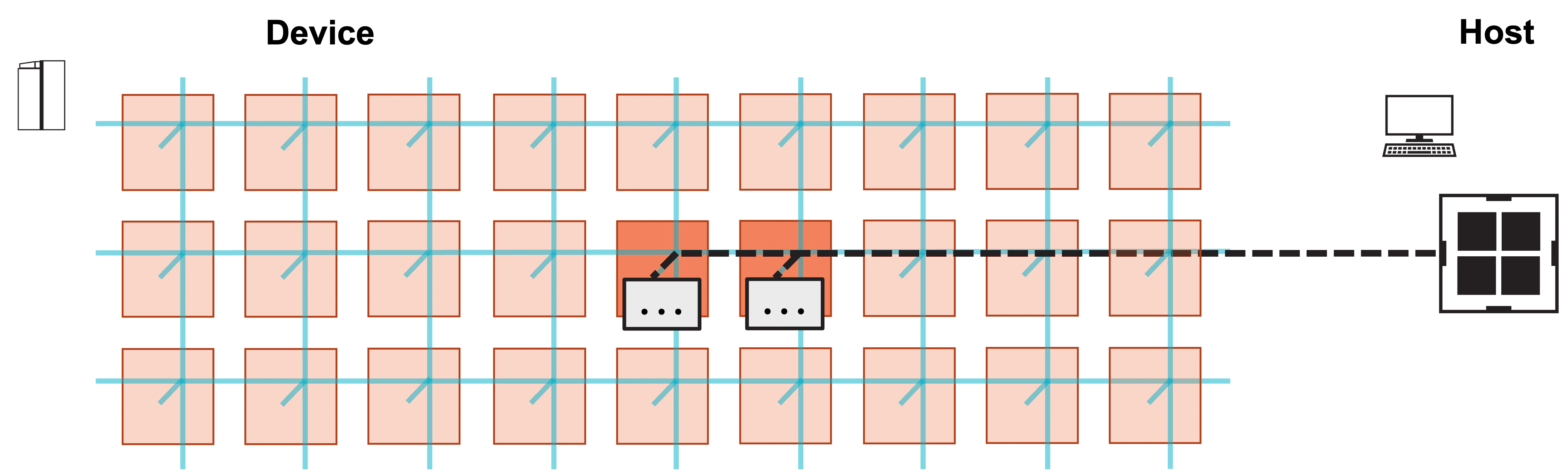
 **4. Host launches function to compute GEMV.**
 **5. Each PE increments local y by local portion of matrix-vector product Ax.**
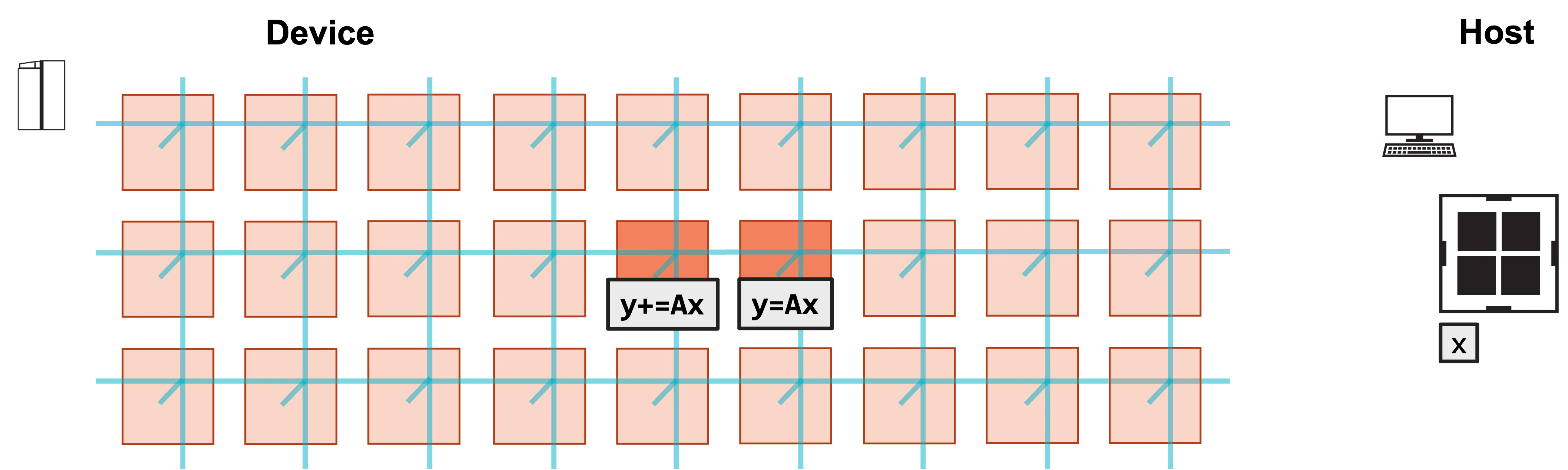 **6. Left PE sends local y to right PE, and right PE increments y by received values.**
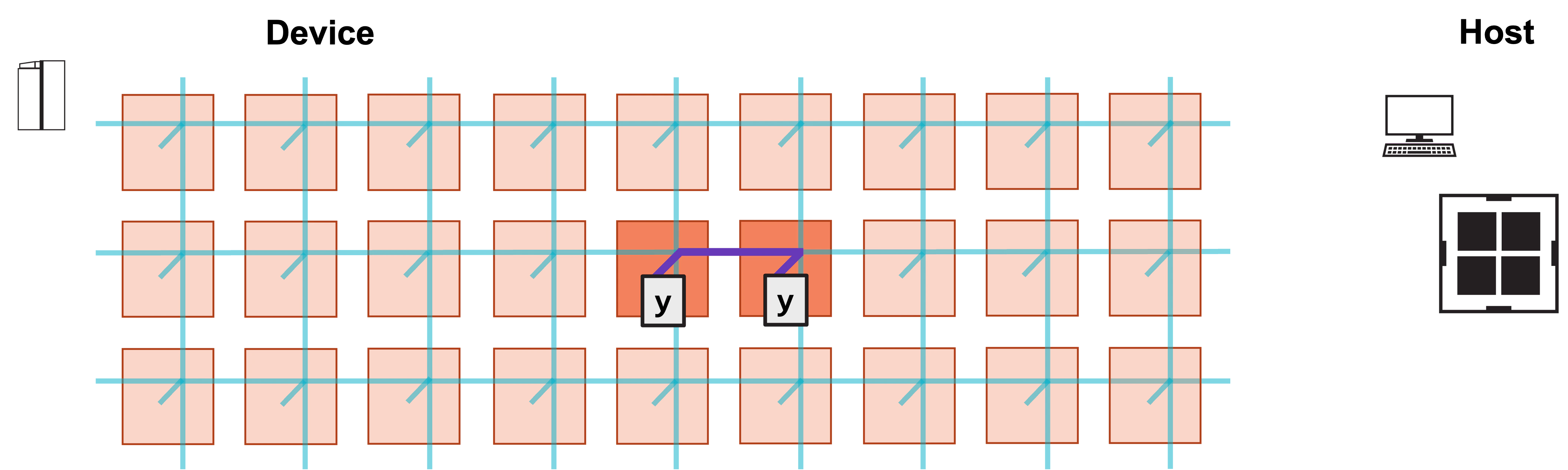 **7. Right PE now contains final result y. Host copies back y from right PE.**
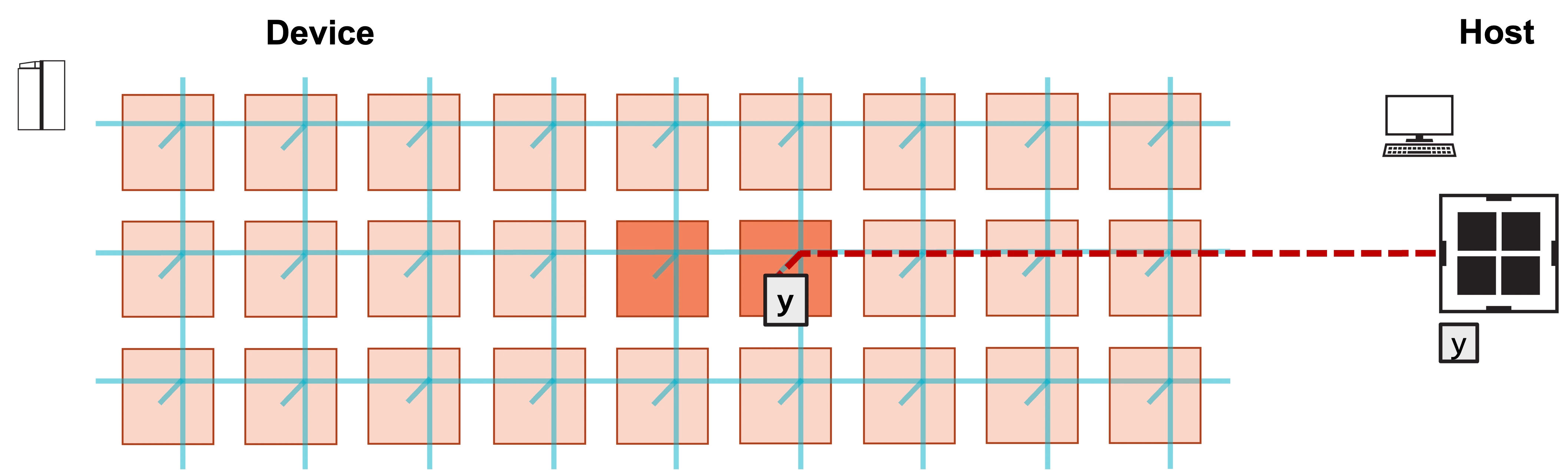 ## Writing the CSL
What do we need to modify in our layout to distribute our GEMV
between two PEs?
1. We need to define several new parameters for our two PE programs.
This includes a `pe_id`, used to differentiate between the
left and right PEs, and a color, which will be used to route
data between the PEs.
2. We need to set the color configuration on both PEs for the color
that will be used to send the left PE’s `y` array to the
right PE.
Let’s take a look at our new `layout.csl`, included below.
```csl theme={"languages":{"custom":["/languages/csl-tmlanguage.json"]}}
// matrix dimensions on each PE
param M: i16;
param N: i16;
// Colors
const send_color: color = @get_color(0); // Color used to send/recv data between PEs
// This example only uses 2 PEs
const memcpy = @import_module("", .{
.width = 2,
.height = 1,
});
layout {
// PE coordinates are (column, row)
@set_rectangle(2, 1);
// Left PE (0, 0)
@set_tile_code(0, 0, "pe_program.csl", .{
.memcpy_params = memcpy.get_params(0),
.M = M,
.N_per_PE = N / 2,
.pe_id = 0,
.send_color = send_color
});
// Left PE sends its result to the right
@set_color_config(0, 0, send_color, .{.routes = .{ .rx = .{RAMP}, .tx = .{EAST} }});
// Right PE (1, 0)
@set_tile_code(1, 0, "pe_program.csl", .{
.memcpy_params = memcpy.get_params(1),
.M = M,
.N_per_PE = N / 2,
.pe_id = 1,
.send_color = send_color
});
// Right PE receives result of left PE
@set_color_config(1, 0, send_color, .{.routes = .{ .rx = .{WEST}, .tx = .{RAMP} }});
// export symbol names
@export_name("A", [*]f32, true);
@export_name("x", [*]f32, true);
@export_name("y", [*]f32, true);
@export_name("compute", fn()void);
}
```
We have two `@set_tile_code` calls, one for the left PE (0, 0),
and one for the right PE (1, 0).
Both PEs take a new parameter, `N_per_PE`, equal to `N / 2`.
This is the number of columns of `A` that each PE will receive
and operate on.
Both PEs also receive as a parameter a `pe_id`: the left PE
has `pe_id` 0, and the right PE has `pe_id` 1.
We’ll see in `pe_program.csl` how we use `pe_id` to parameterize
the behavior of the program.
We also have two `@set_color_config` calls, to set the configuration
of `send_color` on each PE:
```csl theme={"languages":{"custom":["/languages/csl-tmlanguage.json"]}}
@set_color_config(0, 0, send_color, .{.routes = .{ .rx = .{RAMP}, .tx = .{EAST} }});
...
@set_color_config(1, 0, send_color, .{.routes = .{ .rx = .{WEST}, .tx = .{RAMP} }});
```
The router of each PE has five directions: `RAMP`, `NORTH`, `SOUTH`, `EAST`, `WEST`.
The cardinal directions refer to the routers of neighboring PEs:
`NORTH` is the PE directly above our PE, and so on.
`RAMP` refers to the connection between our PE’s router and its compute element (CE).
When setting a route for a color on a given PE, the receive `rx` and transmit `tx` fields
are from the perspective of the router.
Thus, receiving form the `RAMP` means that our compute element is sending data up to the
fabric, where it can then be transmitted across the fabric.
For the left PE (0, 0), `send_color` will send up the PE’s `RAMP` to the fabric, and then
transmit data to the `EAST`.
For the right PE (1, 0), `send_color` will receive data from the `WEST` on the fabric
(i.e., from the left PE), and then transmit it down the `RAMP` to its compute element.
Now let’s take a look at our new `pe_program.csl`, included below.
```csl theme={"languages":{"custom":["/languages/csl-tmlanguage.json"]}}
param memcpy_params;
// Matrix dimensions
param M: i16;
param N_per_PE: i16;
// ID of PE (0 is left, 1 is right)
param pe_id: i16;
// Colors
param send_color: color; // Color used to send/recv data between PEs
// Queue IDs
const send_color_oq = @get_output_queue(2);
const send_color_iq = @get_input_queue(2);
// Task ID used by a local task to unblock cmd stream
const exit_task_id: local_task_id = @get_local_task_id(9);
// memcpy module provides infrastructure for copying data
// and launching functions from the host
const sys_mod = @import_module("", memcpy_params);
// 48 kB of global memory contain A, x, y
var A: [M*N_per_PE]f32; // A is stored column major
var x: [N_per_PE]f32;
var y: [M]f32;
// DSDs for accessing A, b, y
// A_dsd accesses column of A
var A_dsd = @get_dsd(mem1d_dsd, .{ .base_address = &A, .extent = M });
var y_dsd = @get_dsd(mem1d_dsd, .{ .base_address = &y, .extent = M });
// ptrs to A, x, b, y will be advertised as symbols to host
var A_ptr: [*]f32 = &A;
var x_ptr: [*]f32 = &x;
var y_ptr: [*]f32 = &y;
// Compute gemv
fn gemv() void {
// Loop over all columns of A
for (@range(i16, N_per_PE)) |i| {
// Calculate contribution to A*x from ith column of A, ith elem of x
@fmacs(y_dsd, y_dsd, A_dsd, x[i]);
// Move A_dsd to next column of A
A_dsd = @increment_dsd_offset(A_dsd, M, f32);
}
}
fn send_right() void {
const out_dsd = @get_dsd(fabout_dsd, if (@is_arch("wse3")) .{
.extent = M, .output_queue = send_color_oq
} else .{
.fabric_color = send_color, .extent = M,
.output_queue = send_color_oq
});
// After fmovs is done, activate exit_task to unblock cmd_stream
@fmovs(out_dsd, y_dsd, .{ .async = true, .activate = exit_task_id });
}
fn recv_left() void {
const in_dsd = @get_dsd(fabin_dsd, .{
.extent = M,
.input_queue = send_color_iq
});
// After fadds is done, activate exit_task to unblock cmd stream
@fadds(y_dsd, y_dsd, in_dsd, .{ .async = true, .activate = exit_task_id });
}
// Call gemv function and send/ receive partial result y
fn compute() void {
gemv();
if (pe_id == 0) {
send_right();
} else {
recv_left();
}
}
task exit_task() void {
sys_mod.unblock_cmd_stream();
}
comptime {
// When exit_task_id is activated, exit_task will execute
@bind_local_task(exit_task, exit_task_id);
// On WSE-3, we must explicitly bind the output queue to a color.
// Input queues must be bound to a color on both architectures.
@initialize_queue(send_color_oq, if (@is_arch("wse3")) .{ .color = send_color } else .{});
@initialize_queue(send_color_iq, .{ .color = send_color });
@export_symbol(A_ptr, "A");
@export_symbol(x_ptr, "x");
@export_symbol(y_ptr, "y");
@export_symbol(compute);
}
```
In addition to our new parameters `N_per_PE`, `pe_id`, and `send_color`,
we also introduce `exit_task_id`, our first value of type `local_task_id`.
We’ll talk about its use a bit later.
The `A` array now has size `M*N_per_PE` instead of `M*N`, since each PE
only stores half the columns.
To make our data transfer easier, we also now store `A` column-major instead
of row-major.
Notice that `A_dsd` now accesses `M` contiguous elements, instead of `M`
elements strided by the row size, since we now store column-major.
Our `gemv` function operates almost identically to before, except we only loop
over `N_per_PE` columns instead of `N` columns.
Since `A` is now column-major, `@increment_dsd_offset` must increment
by the length of an entire column instead of by one element.
Note that on the left PE, `y` already contains the elements of `b` before
`gemv` executes.
### Fabric DSDs and Async Operations
The `compute` function, which is called from the host, first calls `gemv`
to compute the local contribution to `y` on each PE.
Then, the left PE calls `send_right`, while the right PE calls `recv_left`.
`send_right` defines a `fabout_dsd`, which is used to send wavelets to the
fabric along the color `send_color`.
Note that we give this `fabout_dsd` the extent `M`, since we intend to send
the `M` elements of `y` along the fabric.
On WSE-3, a fabric DSD is bound to a color indirectly via its queue, so
`.fabric_color` is omitted from the WSE-3 form; on WSE-2 the color is
specified directly on the DSD.
The `@fmovs` operation copies the `M` elements accessed by `y_dsd`
into `out_dsd`.
The `.async = true` field makes this operation asynchronous.
The `.activate` field specifies a `local_task_id` to activate when this
operation completes.
When this operation completes, `exit_task_id` will be activated.
`recv_left` defines a `fabin_dsd` to receive the wavelets sent along
`send_color`.
The `@fadds` operation here increments the right PE’s `y_dsd` by the
elements received in `in_dsd`.
Thus, after this operation, `y_dsd` contains our final GEMV result.
This builtin also executes asynchronously, and actives `exit_task_id`
when complete.
**Warning**
## Writing the CSL
What do we need to modify in our layout to distribute our GEMV
between two PEs?
1. We need to define several new parameters for our two PE programs.
This includes a `pe_id`, used to differentiate between the
left and right PEs, and a color, which will be used to route
data between the PEs.
2. We need to set the color configuration on both PEs for the color
that will be used to send the left PE’s `y` array to the
right PE.
Let’s take a look at our new `layout.csl`, included below.
```csl theme={"languages":{"custom":["/languages/csl-tmlanguage.json"]}}
// matrix dimensions on each PE
param M: i16;
param N: i16;
// Colors
const send_color: color = @get_color(0); // Color used to send/recv data between PEs
// This example only uses 2 PEs
const memcpy = @import_module("", .{
.width = 2,
.height = 1,
});
layout {
// PE coordinates are (column, row)
@set_rectangle(2, 1);
// Left PE (0, 0)
@set_tile_code(0, 0, "pe_program.csl", .{
.memcpy_params = memcpy.get_params(0),
.M = M,
.N_per_PE = N / 2,
.pe_id = 0,
.send_color = send_color
});
// Left PE sends its result to the right
@set_color_config(0, 0, send_color, .{.routes = .{ .rx = .{RAMP}, .tx = .{EAST} }});
// Right PE (1, 0)
@set_tile_code(1, 0, "pe_program.csl", .{
.memcpy_params = memcpy.get_params(1),
.M = M,
.N_per_PE = N / 2,
.pe_id = 1,
.send_color = send_color
});
// Right PE receives result of left PE
@set_color_config(1, 0, send_color, .{.routes = .{ .rx = .{WEST}, .tx = .{RAMP} }});
// export symbol names
@export_name("A", [*]f32, true);
@export_name("x", [*]f32, true);
@export_name("y", [*]f32, true);
@export_name("compute", fn()void);
}
```
We have two `@set_tile_code` calls, one for the left PE (0, 0),
and one for the right PE (1, 0).
Both PEs take a new parameter, `N_per_PE`, equal to `N / 2`.
This is the number of columns of `A` that each PE will receive
and operate on.
Both PEs also receive as a parameter a `pe_id`: the left PE
has `pe_id` 0, and the right PE has `pe_id` 1.
We’ll see in `pe_program.csl` how we use `pe_id` to parameterize
the behavior of the program.
We also have two `@set_color_config` calls, to set the configuration
of `send_color` on each PE:
```csl theme={"languages":{"custom":["/languages/csl-tmlanguage.json"]}}
@set_color_config(0, 0, send_color, .{.routes = .{ .rx = .{RAMP}, .tx = .{EAST} }});
...
@set_color_config(1, 0, send_color, .{.routes = .{ .rx = .{WEST}, .tx = .{RAMP} }});
```
The router of each PE has five directions: `RAMP`, `NORTH`, `SOUTH`, `EAST`, `WEST`.
The cardinal directions refer to the routers of neighboring PEs:
`NORTH` is the PE directly above our PE, and so on.
`RAMP` refers to the connection between our PE’s router and its compute element (CE).
When setting a route for a color on a given PE, the receive `rx` and transmit `tx` fields
are from the perspective of the router.
Thus, receiving form the `RAMP` means that our compute element is sending data up to the
fabric, where it can then be transmitted across the fabric.
For the left PE (0, 0), `send_color` will send up the PE’s `RAMP` to the fabric, and then
transmit data to the `EAST`.
For the right PE (1, 0), `send_color` will receive data from the `WEST` on the fabric
(i.e., from the left PE), and then transmit it down the `RAMP` to its compute element.
Now let’s take a look at our new `pe_program.csl`, included below.
```csl theme={"languages":{"custom":["/languages/csl-tmlanguage.json"]}}
param memcpy_params;
// Matrix dimensions
param M: i16;
param N_per_PE: i16;
// ID of PE (0 is left, 1 is right)
param pe_id: i16;
// Colors
param send_color: color; // Color used to send/recv data between PEs
// Queue IDs
const send_color_oq = @get_output_queue(2);
const send_color_iq = @get_input_queue(2);
// Task ID used by a local task to unblock cmd stream
const exit_task_id: local_task_id = @get_local_task_id(9);
// memcpy module provides infrastructure for copying data
// and launching functions from the host
const sys_mod = @import_module("", memcpy_params);
// 48 kB of global memory contain A, x, y
var A: [M*N_per_PE]f32; // A is stored column major
var x: [N_per_PE]f32;
var y: [M]f32;
// DSDs for accessing A, b, y
// A_dsd accesses column of A
var A_dsd = @get_dsd(mem1d_dsd, .{ .base_address = &A, .extent = M });
var y_dsd = @get_dsd(mem1d_dsd, .{ .base_address = &y, .extent = M });
// ptrs to A, x, b, y will be advertised as symbols to host
var A_ptr: [*]f32 = &A;
var x_ptr: [*]f32 = &x;
var y_ptr: [*]f32 = &y;
// Compute gemv
fn gemv() void {
// Loop over all columns of A
for (@range(i16, N_per_PE)) |i| {
// Calculate contribution to A*x from ith column of A, ith elem of x
@fmacs(y_dsd, y_dsd, A_dsd, x[i]);
// Move A_dsd to next column of A
A_dsd = @increment_dsd_offset(A_dsd, M, f32);
}
}
fn send_right() void {
const out_dsd = @get_dsd(fabout_dsd, if (@is_arch("wse3")) .{
.extent = M, .output_queue = send_color_oq
} else .{
.fabric_color = send_color, .extent = M,
.output_queue = send_color_oq
});
// After fmovs is done, activate exit_task to unblock cmd_stream
@fmovs(out_dsd, y_dsd, .{ .async = true, .activate = exit_task_id });
}
fn recv_left() void {
const in_dsd = @get_dsd(fabin_dsd, .{
.extent = M,
.input_queue = send_color_iq
});
// After fadds is done, activate exit_task to unblock cmd stream
@fadds(y_dsd, y_dsd, in_dsd, .{ .async = true, .activate = exit_task_id });
}
// Call gemv function and send/ receive partial result y
fn compute() void {
gemv();
if (pe_id == 0) {
send_right();
} else {
recv_left();
}
}
task exit_task() void {
sys_mod.unblock_cmd_stream();
}
comptime {
// When exit_task_id is activated, exit_task will execute
@bind_local_task(exit_task, exit_task_id);
// On WSE-3, we must explicitly bind the output queue to a color.
// Input queues must be bound to a color on both architectures.
@initialize_queue(send_color_oq, if (@is_arch("wse3")) .{ .color = send_color } else .{});
@initialize_queue(send_color_iq, .{ .color = send_color });
@export_symbol(A_ptr, "A");
@export_symbol(x_ptr, "x");
@export_symbol(y_ptr, "y");
@export_symbol(compute);
}
```
In addition to our new parameters `N_per_PE`, `pe_id`, and `send_color`,
we also introduce `exit_task_id`, our first value of type `local_task_id`.
We’ll talk about its use a bit later.
The `A` array now has size `M*N_per_PE` instead of `M*N`, since each PE
only stores half the columns.
To make our data transfer easier, we also now store `A` column-major instead
of row-major.
Notice that `A_dsd` now accesses `M` contiguous elements, instead of `M`
elements strided by the row size, since we now store column-major.
Our `gemv` function operates almost identically to before, except we only loop
over `N_per_PE` columns instead of `N` columns.
Since `A` is now column-major, `@increment_dsd_offset` must increment
by the length of an entire column instead of by one element.
Note that on the left PE, `y` already contains the elements of `b` before
`gemv` executes.
### Fabric DSDs and Async Operations
The `compute` function, which is called from the host, first calls `gemv`
to compute the local contribution to `y` on each PE.
Then, the left PE calls `send_right`, while the right PE calls `recv_left`.
`send_right` defines a `fabout_dsd`, which is used to send wavelets to the
fabric along the color `send_color`.
Note that we give this `fabout_dsd` the extent `M`, since we intend to send
the `M` elements of `y` along the fabric.
On WSE-3, a fabric DSD is bound to a color indirectly via its queue, so
`.fabric_color` is omitted from the WSE-3 form; on WSE-2 the color is
specified directly on the DSD.
The `@fmovs` operation copies the `M` elements accessed by `y_dsd`
into `out_dsd`.
The `.async = true` field makes this operation asynchronous.
The `.activate` field specifies a `local_task_id` to activate when this
operation completes.
When this operation completes, `exit_task_id` will be activated.
`recv_left` defines a `fabin_dsd` to receive the wavelets sent along
`send_color`.
The `@fadds` operation here increments the right PE’s `y_dsd` by the
elements received in `in_dsd`.
Thus, after this operation, `y_dsd` contains our final GEMV result.
This builtin also executes asynchronously, and actives `exit_task_id`
when complete.
**Warning**
Whenever using fabric DSDs in builtin operations, always make these operations
execute asynchronously.
Using fabric DSDs synchronously can result in poor performance or deadlocks.
### Tasks and Activatable Task IDs
Now, what does activating `exit_task_id` do?
In the comptime block, the `@bind_local_task` builtin binds `exit_task_id`
to the task `exit_task`.
When `exit_task_id` is activated, `exit_task`, which unblocks the `memcpy`
command stream, executes.
This task must execute on both PEs before control is returned to the host.
## Writing the Host Code
Our new host code must:
1. Copy `b` into the left PE’s `y` array
2. Copy the left halves of `A` and `x` to the left PE, and the right halves to the right PE
3. After the device kernel completes, copy `y` back from the right PE
We explain some features of our new `run.py` below.
```python theme={"languages":{"custom":["/languages/csl-tmlanguage.json"]}}
#!/usr/bin/env cs_python
import argparse
import json
import numpy as np
from cerebras.sdk.runtime.sdkruntimepybind import SdkRuntime, MemcpyDataType, MemcpyOrder # pylint: disable=no-name-in-module
# Read arguments
parser = argparse.ArgumentParser()
parser.add_argument('--name', help="the test compile output dir")
parser.add_argument('--cmaddr', help="IP:port for CS system")
args = parser.parse_args()
# Get matrix dimensions from compile metadata
with open(f"{args.name}/out.json", encoding='utf-8') as json_file:
compile_data = json.load(json_file)
# Matrix dimensions
N = int(compile_data['params']['N'])
M = int(compile_data['params']['M'])
# Construct A, x, b
A = np.arange(M*N, dtype=np.float32).reshape(M,N)
x = np.full(shape=N, fill_value=1.0, dtype=np.float32)
b = np.full(shape=M, fill_value=2.0, dtype=np.float32)
# Calculate expected y
y_expected = A@x + b
# Size of N dimension on each PE
N_per_PE = N // 2
# Construct a runner using SdkRuntime
runner = SdkRuntime(args.name, cmaddr=args.cmaddr)
# Get symbols for A, x, y on device
A_symbol = runner.get_id('A')
x_symbol = runner.get_id('x')
y_symbol = runner.get_id('y')
# Load and run the program
runner.load()
runner.run()
# Copy b into y of PE (0, 0)
runner.memcpy_h2d(y_symbol, b, 0, 0, 1, 1, M, streaming=False,
order=MemcpyOrder.ROW_MAJOR, data_type=MemcpyDataType.MEMCPY_32BIT, nonblock=False)
# Copy A in column major format
# PE (0, 0) gets first N/2 columns; PE (1, 0) gets last N/2 columns
runner.memcpy_h2d(A_symbol, A.transpose().ravel(), 0, 0, 2, 1, M*N_per_PE, streaming=False,
order=MemcpyOrder.ROW_MAJOR, data_type=MemcpyDataType.MEMCPY_32BIT, nonblock=False)
# PE (0, 0) gets first N/2 elements; PE (1, 0) gets last N/2 elements
runner.memcpy_h2d(x_symbol, x, 0, 0, 2, 1, N_per_PE, streaming=False,
order=MemcpyOrder.ROW_MAJOR, data_type=MemcpyDataType.MEMCPY_32BIT, nonblock=False)
# Launch the compute function on device
runner.launch('compute', nonblock=False)
# Copy y back from PE (1, 0)
y_result = np.zeros([M], dtype=np.float32)
runner.memcpy_d2h(y_result, y_symbol, 1, 0, 1, 1, M, streaming=False,
order=MemcpyOrder.ROW_MAJOR, data_type=MemcpyDataType.MEMCPY_32BIT, nonblock=False)
# Stop the program
runner.stop()
# Ensure that the result matches our expectation
np.testing.assert_allclose(y_result, y_expected, atol=0.01, rtol=0)
print("SUCCESS!")
```
### Copying `b` into `y` of left PE
We copy `b` into `y` of the left PE here:
```python theme={"languages":{"custom":["/languages/csl-tmlanguage.json"]}}
runner.memcpy_h2d(y_symbol, b, 0, 0, 1, 1, M, streaming=False,
order=MemcpyOrder.ROW_MAJOR, data_type=MemcpyDataType.MEMCPY_32BIT, nonblock=False)
```
Notice that the ROI is a single PE, located at (0, 0) in the program rectangle.
The right PE (1, 0) is omitted from this `memcpy` call.
### Copying `A` and `x`
We copy `A` and `x` to the device as follows:
```python theme={"languages":{"custom":["/languages/csl-tmlanguage.json"]}}
runner.memcpy_h2d(A_symbol, A.transpose().ravel(), 0, 0, 2, 1, M*N_per_PE, streaming=False,
order=MemcpyOrder.ROW_MAJOR, data_type=MemcpyDataType.MEMCPY_32BIT, nonblock=False)
runner.memcpy_h2d(x_symbol, x, 0, 0, 2, 1, N_per_PE, streaming=False,
order=MemcpyOrder.ROW_MAJOR, data_type=MemcpyDataType.MEMCPY_32BIT, nonblock=False)
```
Notice that the ROI is now both PEs, so the `memcpy` calls copy data into
both the left and right PE.
Because we now store `A` column-major on the PEs, we transpose our `A`
matrix, and then flatten it to a 1D array with `ravel()`.
Each PE gets `M*N_per_PE` elements, so each PE gets `N_per_PE` columms
of `A`.
Similarly, each PE gets `N_per_PE` elements of `x`.
### Copying Back Result
We copy back `y` from the right PE as follows:
```python theme={"languages":{"custom":["/languages/csl-tmlanguage.json"]}}
y_result = np.zeros([M], dtype=np.float32)
runner.memcpy_d2h(y_result, y_symbol, 1, 0, 1, 1, M, streaming=False,
order=MemcpyOrder.ROW_MAJOR, data_type=MemcpyDataType.MEMCPY_32BIT, nonblock=False)
```
Notice that our ROI now begins at (1, 0), and contains a single PE.
Thus, this `memcpy` call copies back the `M` elements of `y`
only from the right PE.
Once this call is complete, we then, as in our previous tutorials,
check that the received result is correct.
## Compiling and Running the Program
Since this program only uses two PEs, we adjust our
simulated fabric dimensions accordingly:
```bash theme={"languages":{"custom":["/languages/csl-tmlanguage.json"]}}
$ cslc layout.csl --fabric-dims=9,3 --fabric-offsets=4,1 --params=M:4,N:6 --memcpy --channels=1 -o out
$ cs_python run.py --name out
```
We use the same command to run.
You should see a `SUCCESS!` message at the end of execution.
## Exercises
Instead of using two PEs along the same row to compute this GEMV,
try using two PEs along the same column.
## Next
Stay tuned for more tutorials!