> ## Documentation Index
> Fetch the complete documentation index at: https://sdk.cerebras.ai/llms.txt
> Use this file to discover all available pages before exploring further.
# GEMV Tutorial 5: Multiple PEs
> Scale your CSL program to run across multiple processing elements by configuring a multi-PE layout and copying data to and from each PE.
The power of the Wafer-Scale Engine lies in its hundreds
of thousands of processing elements.
Now that we’ve covered some basics for writing a complete
program using a single PE,
let’s create our first program using multiple PEs.
## Learning Objectives
After completing this tutorial, you should know how to:
* Define a layout file that compiles code for multiple PEs
* Copy data to and from multiple PEs on the device
## Example Overview
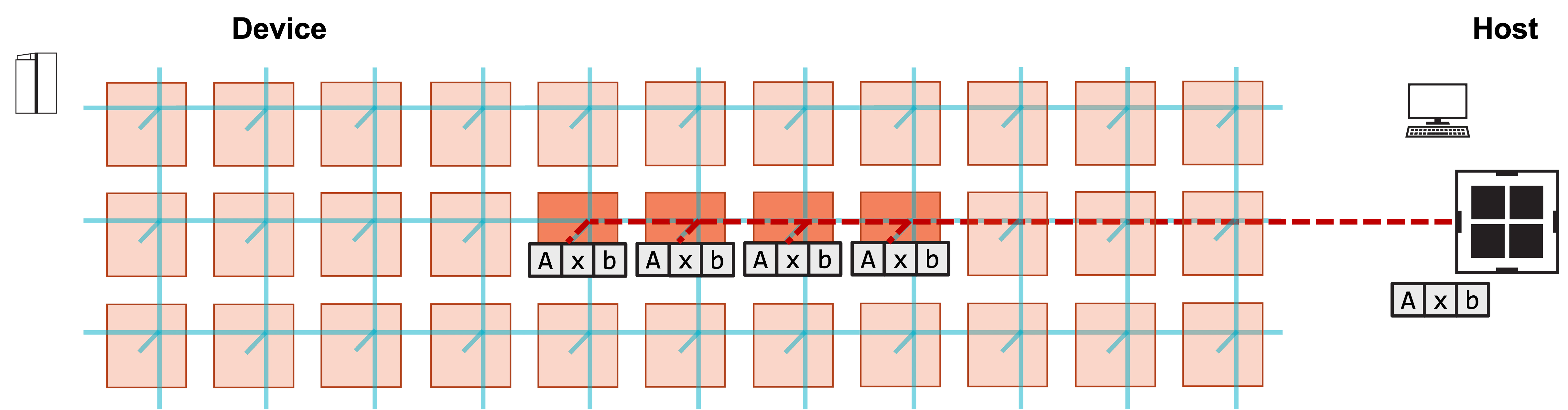
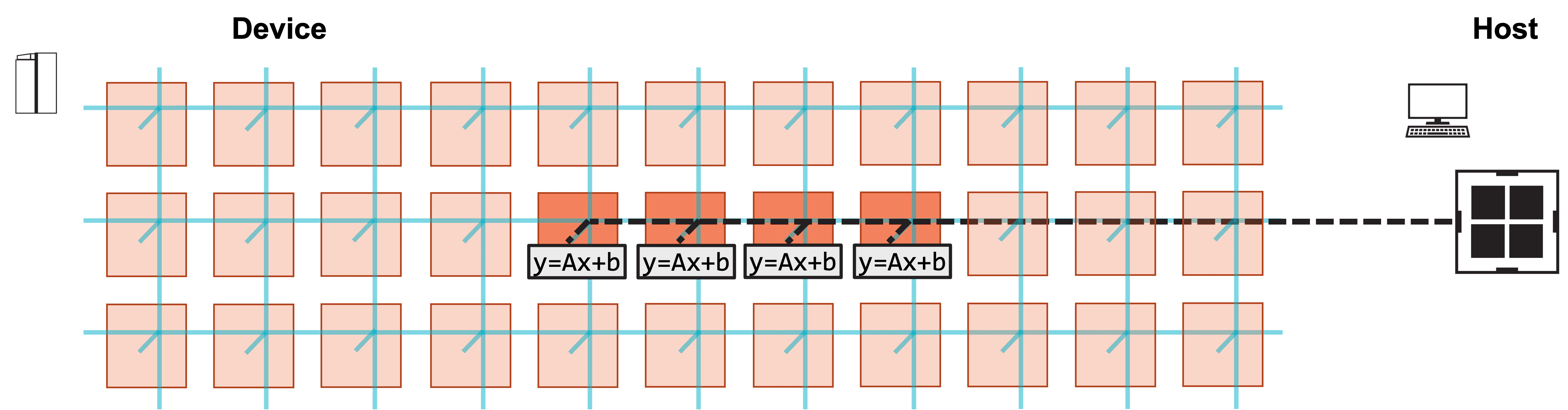
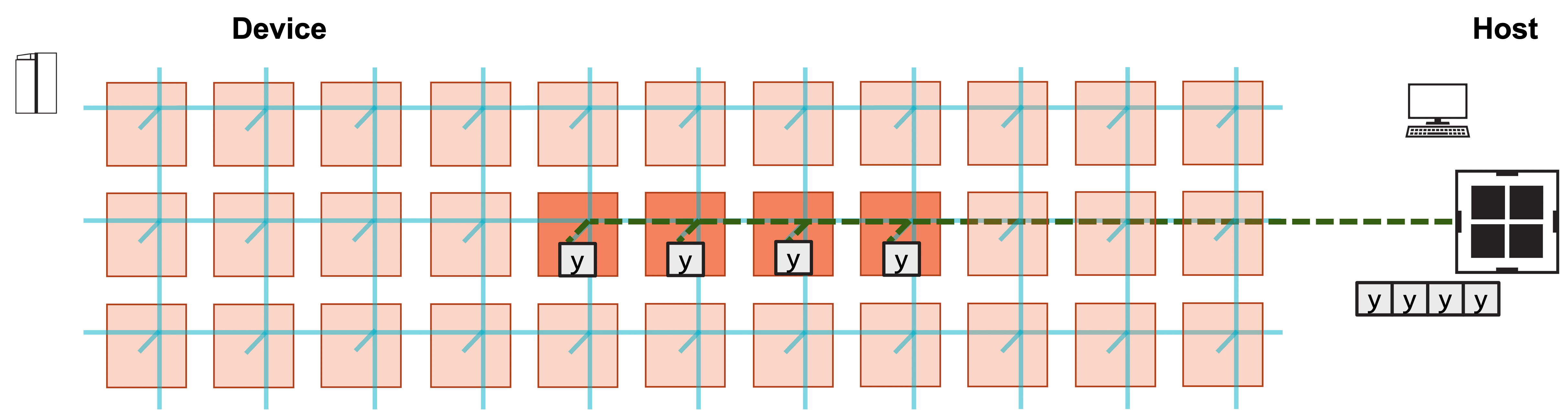
Our program will now run on four processing elements (PE).
We will demonstrate the program
with a simulated fabric consisting of an 11 x 3 block of PEs.
For this program, each PE will perform the exact same work;
that is, we will copy `A`, `x`, and `b` to each of
the four PEs, the four PEs will each perform a GEMV,
and then we will copy back the result `y` from each PE.
`pe_program.csl` does not change.
We simply need to modify `layout.csl` to assign it to
multiple PEs.
We also need to modify our host code to copy to and from
multiple PEs instead of just one.
### Problem Steps
Visually, this program consists of the following steps:
**1. Host copies A, x, b to four PEs on device.**
 **2. Host launches function on each PE to compute y.**
 **3. Host copies result y from each PE.**
 ## Modifying the CSL
How do we need to modify our layout file to support running the
program on multiple PEs?
1. We need to modify `@set_rectangle` to reflect our new program
rectangle.
2. We need to modify our `memcpy` infrastructure to reflect
the use of multiple PEs.
3. We need to call `@set_tile_code` for each coordinate inside
this program rectangle.
`pe_program.csl` remains largely the same; we simply assign it to
more PEs.
We include the new `layout.csl` below, and highlight the changes.
```csl theme={"languages":{"custom":["/languages/csl-tmlanguage.json"]}}
// matrix dimensions on each PE
param M: i16;
param N: i16;
// number of PEs in program
param width: i16;
const memcpy = @import_module("", .{
.width = width,
.height = 1
});
layout {
// PE coordinates are (column, row)
@set_rectangle(width, 1);
for (@range(i16, width)) |x| {
@set_tile_code(x, 0, "pe_program.csl", .{
.memcpy_params = memcpy.get_params(x),
.M = M,
.N = N
});
}
// export symbol names
@export_name("A", [*]f32, true);
@export_name("x", [*]f32, true);
@export_name("b", [*]f32, true);
@export_name("y", [*]f32, false);
@export_name("compute", fn()void);
}
```
Notice that we define a new compile time parameter `width`,
whose value will be set in our compile command.
We will use this value to set the number of PEs in our
row of PEs used by the program.
When we import ``, we use `width`
to specify the width of the program rectangle for which memcpy
infrastructure will be generated.
The `height` is still 1.
Inside of our layout block, our program rectangle is now
specified with `@set_rectangle(width, 1)`.
For each of the PEs in this rectangle, we must call `@set_tile_code`,
so we do this in a loop.
The loop coordinate is the PE’s `x`-coordinate, or column number,
which is needed to set the correct `memcpy_params` for each PE.
## Modifying the Host Code
Our host code must now copy `A`, `x` and `b` to multiple PEs,
and must copy back `y` from multiple PEs.
Let’s take a look at how we must modify our `memcpy_h2d` and
`memcpy_d2h` calls in `run.py` to do this:
```python theme={"languages":{"custom":["/languages/csl-tmlanguage.json"]}}
#!/usr/bin/env cs_python
import argparse
import json
import numpy as np
from cerebras.sdk.runtime.sdkruntimepybind import SdkRuntime, MemcpyDataType, MemcpyOrder # pylint: disable=no-name-in-module
# Read arguments
parser = argparse.ArgumentParser()
parser.add_argument('--name', help="the test compile output dir")
parser.add_argument('--cmaddr', help="IP:port for CS system")
args = parser.parse_args()
# Get matrix dimensions from compile metadata
with open(f"{args.name}/out.json", encoding='utf-8') as json_file:
compile_data = json.load(json_file)
# Matrix dimensions
N = int(compile_data['params']['N'])
M = int(compile_data['params']['M'])
# Number of PEs in program
width = int(compile_data['params']['width'])
# Construct A, x, b
A = np.arange(M*N, dtype=np.float32)
x = np.full(shape=N, fill_value=1.0, dtype=np.float32)
b = np.full(shape=M, fill_value=2.0, dtype=np.float32)
# Calculate expected y
y_expected = A.reshape(M,N)@x + b
# Construct a runner using SdkRuntime
runner = SdkRuntime(args.name, cmaddr=args.cmaddr)
# Get symbols for A, x, b, y on device
A_symbol = runner.get_id('A')
x_symbol = runner.get_id('x')
b_symbol = runner.get_id('b')
y_symbol = runner.get_id('y')
# Load and run the program
runner.load()
runner.run()
# Copy A, x, b to device
runner.memcpy_h2d(A_symbol, np.tile(A, width), 0, 0, width, 1, M*N, streaming=False,
order=MemcpyOrder.ROW_MAJOR, data_type=MemcpyDataType.MEMCPY_32BIT, nonblock=False)
runner.memcpy_h2d(x_symbol, np.tile(x, width), 0, 0, width, 1, N, streaming=False,
order=MemcpyOrder.ROW_MAJOR, data_type=MemcpyDataType.MEMCPY_32BIT, nonblock=False)
runner.memcpy_h2d(b_symbol, np.tile(b, width), 0, 0, width, 1, M, streaming=False,
order=MemcpyOrder.ROW_MAJOR, data_type=MemcpyDataType.MEMCPY_32BIT, nonblock=False)
# Launch the init_and_compute function on device
runner.launch('compute', nonblock=False)
# Copy y back from device
y_result = np.zeros([M*width], dtype=np.float32)
runner.memcpy_d2h(y_result, y_symbol, 0, 0, width, 1, M, streaming=False,
order=MemcpyOrder.ROW_MAJOR, data_type=MemcpyDataType.MEMCPY_32BIT, nonblock=False)
# Stop the program
runner.stop()
# Ensure that the result matches our expectation
np.testing.assert_allclose(y_result, np.tile(y_expected, width), atol=0.01, rtol=0)
print("SUCCESS!")
```
First, note that we read one more parameter from the compile output, `width`.
Our host code uses this to specify how many PEs it must copy tensors
to and from.
Now let’s take a closer look at the `memcpy_h2d` calls:
```python theme={"languages":{"custom":["/languages/csl-tmlanguage.json"]}}
runner.memcpy_h2d(A_symbol, np.tile(A, width), 0, 0, width, 1, M*N, streaming=False,
order=MemcpyOrder.ROW_MAJOR, data_type=MemcpyDataType.MEMCPY_32BIT, nonblock=False)
runner.memcpy_h2d(x_symbol, np.tile(x, width), 0, 0, width, 1, N, streaming=False,
order=MemcpyOrder.ROW_MAJOR, data_type=MemcpyDataType.MEMCPY_32BIT, nonblock=False)
runner.memcpy_h2d(b_symbol, np.tile(b, width), 0, 0, width, 1, M, streaming=False,
order=MemcpyOrder.ROW_MAJOR, data_type=MemcpyDataType.MEMCPY_32BIT, nonblock=False)
```
We want to copy each of `A`, `x`, and `b` to each PE in our program
rectangle.
But `memcpy_h2d` does not perform a broadcast;
it takes its input array and distributes it within the region of interest (ROI)
based on the `order` parameter.
Here, we use `np.tile` to duplicate each array `width` times.
In the first `memcpy_h2d`, the input array `np.tile(A, width)` is a 1D
array formed by duplicating `A` `width` times, so the full input array’s
size is `M*N*width`.
Our ROI is specified by `0, 0, width, 1`, meaning that we copy to a
row of `width` PEs beginning at PE (0, 0).
We copy `M*N` elements to each PE.
Because our order is `ROW_MAJOR`, the result is that PE (0, 0) will receive
the first `M*N` elements of the tiled array, PE (1, 0) will receive
the next `M*N` elements, and so on.
Thus, each PE will receive an identical `M*N` elements corresponding
to a copy of `A`.
When we copy `y` back from the device, `memcpy_d2h` proceeds similarly:
```python theme={"languages":{"custom":["/languages/csl-tmlanguage.json"]}}
y_result = np.zeros([M*width], dtype=np.float32)
runner.memcpy_d2h(y_result, y_symbol, 0, 0, width, 1, M, streaming=False,
order=MemcpyOrder.ROW_MAJOR, data_type=MemcpyDataType.MEMCPY_32BIT, nonblock=False)
```
Our output array `y_result` has size `M*width`, since each of the `width`
PEs copies back the `M` elements of `y`.
We test that our copied-back result is correct for all PEs by comparing
`y_result` to a tiled `y_expected`.
See [GEMV Tutorial 1: A Complete Program](/csl/tutorials/gemv-01-complete-program) for an explanation of the remaining
arguments.
## Compiling and Running the Program
We add one additional compile time parameter to specify
the width of our program rectangle:
```bash theme={"languages":{"custom":["/languages/csl-tmlanguage.json"]}}
$ cslc layout.csl --fabric-dims=11,3 --fabric-offsets=4,1 --params=M:4,N:6,width:4 --memcpy --channels=1 -o out
$ cs_python run.py --name out
```
We use the same command to run.
You should see a `SUCCESS!` message at the end of execution.
## Exercises
In this program, each PE is computing an identical GEMV.
Modify the program so that each PE receives different values
for the input tensors `A`, `x`, and `b`, and check
that the computed outputs `y` are correct.
## Next
Now that we’ve introduced multiple PEs into our program,
instead of duplicating our GEMV problem between them,
let’s actually distribute the work for computing a single GEMV.
## Modifying the CSL
How do we need to modify our layout file to support running the
program on multiple PEs?
1. We need to modify `@set_rectangle` to reflect our new program
rectangle.
2. We need to modify our `memcpy` infrastructure to reflect
the use of multiple PEs.
3. We need to call `@set_tile_code` for each coordinate inside
this program rectangle.
`pe_program.csl` remains largely the same; we simply assign it to
more PEs.
We include the new `layout.csl` below, and highlight the changes.
```csl theme={"languages":{"custom":["/languages/csl-tmlanguage.json"]}}
// matrix dimensions on each PE
param M: i16;
param N: i16;
// number of PEs in program
param width: i16;
const memcpy = @import_module("", .{
.width = width,
.height = 1
});
layout {
// PE coordinates are (column, row)
@set_rectangle(width, 1);
for (@range(i16, width)) |x| {
@set_tile_code(x, 0, "pe_program.csl", .{
.memcpy_params = memcpy.get_params(x),
.M = M,
.N = N
});
}
// export symbol names
@export_name("A", [*]f32, true);
@export_name("x", [*]f32, true);
@export_name("b", [*]f32, true);
@export_name("y", [*]f32, false);
@export_name("compute", fn()void);
}
```
Notice that we define a new compile time parameter `width`,
whose value will be set in our compile command.
We will use this value to set the number of PEs in our
row of PEs used by the program.
When we import ``, we use `width`
to specify the width of the program rectangle for which memcpy
infrastructure will be generated.
The `height` is still 1.
Inside of our layout block, our program rectangle is now
specified with `@set_rectangle(width, 1)`.
For each of the PEs in this rectangle, we must call `@set_tile_code`,
so we do this in a loop.
The loop coordinate is the PE’s `x`-coordinate, or column number,
which is needed to set the correct `memcpy_params` for each PE.
## Modifying the Host Code
Our host code must now copy `A`, `x` and `b` to multiple PEs,
and must copy back `y` from multiple PEs.
Let’s take a look at how we must modify our `memcpy_h2d` and
`memcpy_d2h` calls in `run.py` to do this:
```python theme={"languages":{"custom":["/languages/csl-tmlanguage.json"]}}
#!/usr/bin/env cs_python
import argparse
import json
import numpy as np
from cerebras.sdk.runtime.sdkruntimepybind import SdkRuntime, MemcpyDataType, MemcpyOrder # pylint: disable=no-name-in-module
# Read arguments
parser = argparse.ArgumentParser()
parser.add_argument('--name', help="the test compile output dir")
parser.add_argument('--cmaddr', help="IP:port for CS system")
args = parser.parse_args()
# Get matrix dimensions from compile metadata
with open(f"{args.name}/out.json", encoding='utf-8') as json_file:
compile_data = json.load(json_file)
# Matrix dimensions
N = int(compile_data['params']['N'])
M = int(compile_data['params']['M'])
# Number of PEs in program
width = int(compile_data['params']['width'])
# Construct A, x, b
A = np.arange(M*N, dtype=np.float32)
x = np.full(shape=N, fill_value=1.0, dtype=np.float32)
b = np.full(shape=M, fill_value=2.0, dtype=np.float32)
# Calculate expected y
y_expected = A.reshape(M,N)@x + b
# Construct a runner using SdkRuntime
runner = SdkRuntime(args.name, cmaddr=args.cmaddr)
# Get symbols for A, x, b, y on device
A_symbol = runner.get_id('A')
x_symbol = runner.get_id('x')
b_symbol = runner.get_id('b')
y_symbol = runner.get_id('y')
# Load and run the program
runner.load()
runner.run()
# Copy A, x, b to device
runner.memcpy_h2d(A_symbol, np.tile(A, width), 0, 0, width, 1, M*N, streaming=False,
order=MemcpyOrder.ROW_MAJOR, data_type=MemcpyDataType.MEMCPY_32BIT, nonblock=False)
runner.memcpy_h2d(x_symbol, np.tile(x, width), 0, 0, width, 1, N, streaming=False,
order=MemcpyOrder.ROW_MAJOR, data_type=MemcpyDataType.MEMCPY_32BIT, nonblock=False)
runner.memcpy_h2d(b_symbol, np.tile(b, width), 0, 0, width, 1, M, streaming=False,
order=MemcpyOrder.ROW_MAJOR, data_type=MemcpyDataType.MEMCPY_32BIT, nonblock=False)
# Launch the init_and_compute function on device
runner.launch('compute', nonblock=False)
# Copy y back from device
y_result = np.zeros([M*width], dtype=np.float32)
runner.memcpy_d2h(y_result, y_symbol, 0, 0, width, 1, M, streaming=False,
order=MemcpyOrder.ROW_MAJOR, data_type=MemcpyDataType.MEMCPY_32BIT, nonblock=False)
# Stop the program
runner.stop()
# Ensure that the result matches our expectation
np.testing.assert_allclose(y_result, np.tile(y_expected, width), atol=0.01, rtol=0)
print("SUCCESS!")
```
First, note that we read one more parameter from the compile output, `width`.
Our host code uses this to specify how many PEs it must copy tensors
to and from.
Now let’s take a closer look at the `memcpy_h2d` calls:
```python theme={"languages":{"custom":["/languages/csl-tmlanguage.json"]}}
runner.memcpy_h2d(A_symbol, np.tile(A, width), 0, 0, width, 1, M*N, streaming=False,
order=MemcpyOrder.ROW_MAJOR, data_type=MemcpyDataType.MEMCPY_32BIT, nonblock=False)
runner.memcpy_h2d(x_symbol, np.tile(x, width), 0, 0, width, 1, N, streaming=False,
order=MemcpyOrder.ROW_MAJOR, data_type=MemcpyDataType.MEMCPY_32BIT, nonblock=False)
runner.memcpy_h2d(b_symbol, np.tile(b, width), 0, 0, width, 1, M, streaming=False,
order=MemcpyOrder.ROW_MAJOR, data_type=MemcpyDataType.MEMCPY_32BIT, nonblock=False)
```
We want to copy each of `A`, `x`, and `b` to each PE in our program
rectangle.
But `memcpy_h2d` does not perform a broadcast;
it takes its input array and distributes it within the region of interest (ROI)
based on the `order` parameter.
Here, we use `np.tile` to duplicate each array `width` times.
In the first `memcpy_h2d`, the input array `np.tile(A, width)` is a 1D
array formed by duplicating `A` `width` times, so the full input array’s
size is `M*N*width`.
Our ROI is specified by `0, 0, width, 1`, meaning that we copy to a
row of `width` PEs beginning at PE (0, 0).
We copy `M*N` elements to each PE.
Because our order is `ROW_MAJOR`, the result is that PE (0, 0) will receive
the first `M*N` elements of the tiled array, PE (1, 0) will receive
the next `M*N` elements, and so on.
Thus, each PE will receive an identical `M*N` elements corresponding
to a copy of `A`.
When we copy `y` back from the device, `memcpy_d2h` proceeds similarly:
```python theme={"languages":{"custom":["/languages/csl-tmlanguage.json"]}}
y_result = np.zeros([M*width], dtype=np.float32)
runner.memcpy_d2h(y_result, y_symbol, 0, 0, width, 1, M, streaming=False,
order=MemcpyOrder.ROW_MAJOR, data_type=MemcpyDataType.MEMCPY_32BIT, nonblock=False)
```
Our output array `y_result` has size `M*width`, since each of the `width`
PEs copies back the `M` elements of `y`.
We test that our copied-back result is correct for all PEs by comparing
`y_result` to a tiled `y_expected`.
See [GEMV Tutorial 1: A Complete Program](/csl/tutorials/gemv-01-complete-program) for an explanation of the remaining
arguments.
## Compiling and Running the Program
We add one additional compile time parameter to specify
the width of our program rectangle:
```bash theme={"languages":{"custom":["/languages/csl-tmlanguage.json"]}}
$ cslc layout.csl --fabric-dims=11,3 --fabric-offsets=4,1 --params=M:4,N:6,width:4 --memcpy --channels=1 -o out
$ cs_python run.py --name out
```
We use the same command to run.
You should see a `SUCCESS!` message at the end of execution.
## Exercises
In this program, each PE is computing an identical GEMV.
Modify the program so that each PE receives different values
for the input tensors `A`, `x`, and `b`, and check
that the computed outputs `y` are correct.
## Next
Now that we’ve introduced multiple PEs into our program,
instead of duplicating our GEMV problem between them,
let’s actually distribute the work for computing a single GEMV.