> ## Documentation Index
> Fetch the complete documentation index at: https://sdk.cerebras.ai/llms.txt
> Use this file to discover all available pages before exploring further.
# GEMV Tutorial 3: Memcpy
> Copy tensor data between host and device using `SdkRuntime`'s `memcpy_h2d` and `memcpy_d2h` functions.
We’ve already written a program that launches a kernel and
copies the result back to the host, so let's extend this to
copying the initial tensors from the host to the device.
This program will now have three phases:
1. Host-to-device memcpy of `A`, `x`, and `b`
2. Kernel launch
3. Device-to-host memcpy of `y`
## Learning Objectives
After completing this tutorial, you should know how to:
* Copy data from host to device using `SdkRuntime`’s `memcpy_h2d` function
## Example Overview
Our program will run on a single processing element (PE).
Like the previous tutorials, we will demonstrate the program
with a simulated fabric consisting of an 8 x 3 block of PEs.
Our problem steps are nearly identical to the previous
tutorials, except we now copy `A`, `x`, and `b` to the
device after initializing them on the host.
`pe_program.csl` no longer needs to initialize `A`, `x`,
and `b`, but both CSL files will need to be updated to
export symbols for these tensors.
The host code will need to introduce three `memcpy_h2d`
calls to copy the tensors to the device.
### Problem Steps
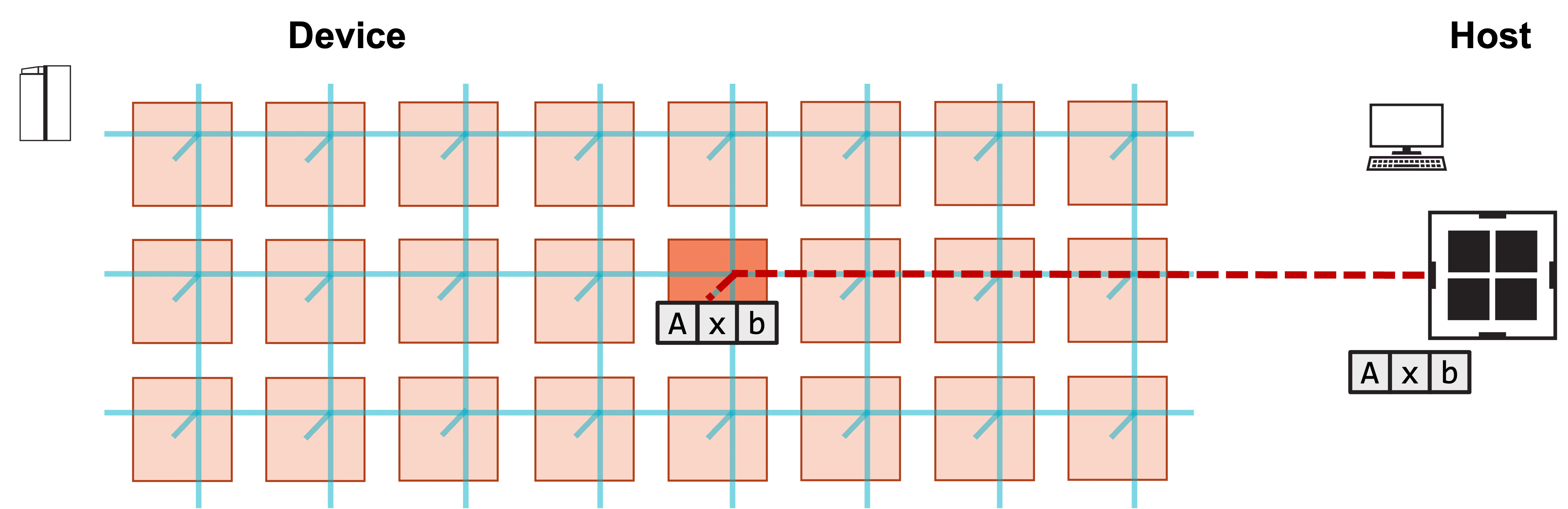
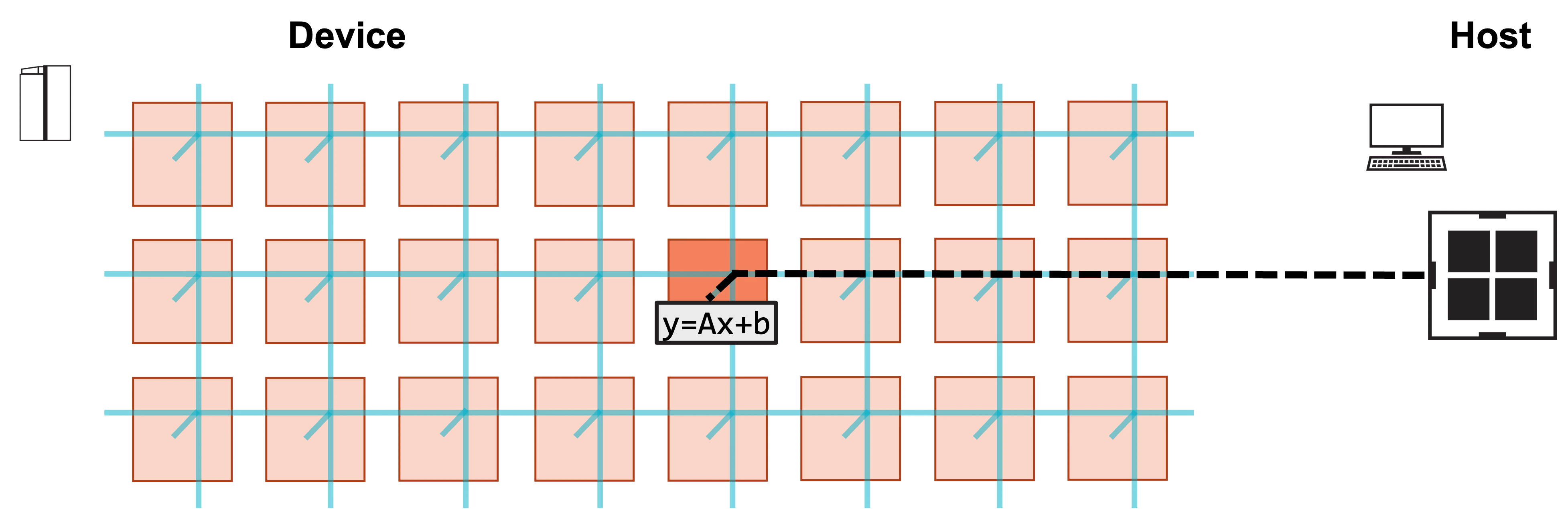
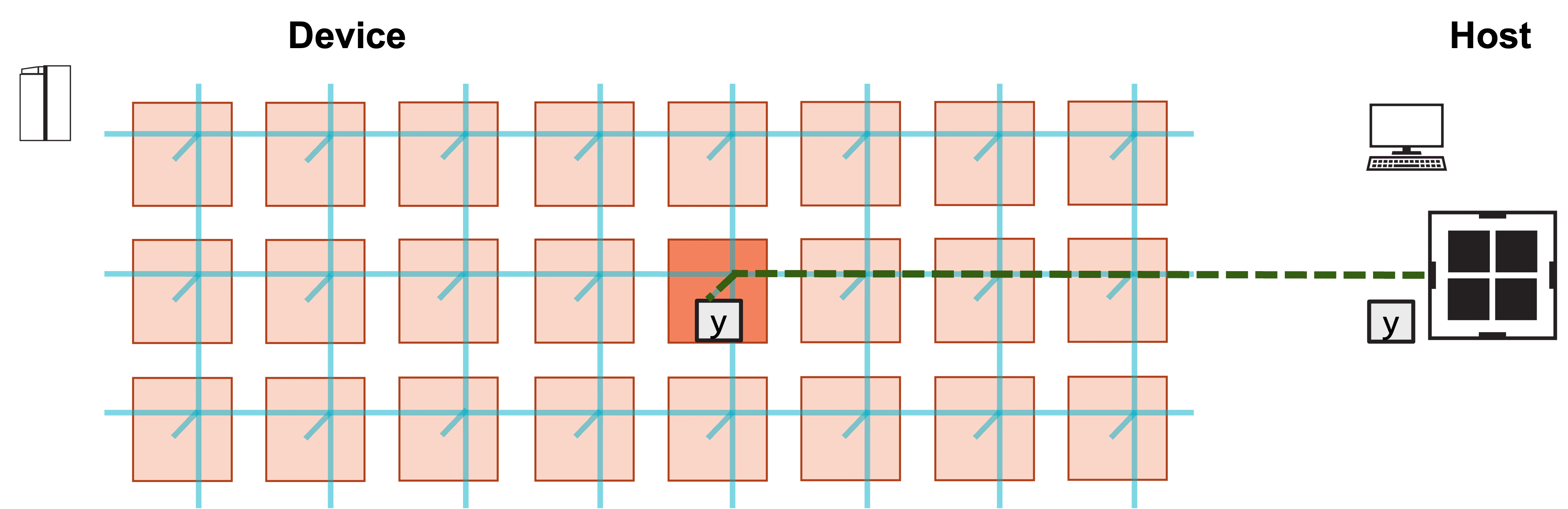
Visually, this program consists of the following steps:
**1. Host copies A, x, b to device.**
 **2. Host launches function to compute y.**
 **3. Host copies result y from device.**
 ## Modifying the CSL
Our previous tutorials initialized `A`, `x`, and `b` on device
before computing GEMV.
What else do we need for our device code to support a host-to-device
memcpy of `A`, `x`, and `b`, so that we need only initialize
them on the host?
1. We need our layout file to export the symbol names for `A`, `x`,
and `b`.
2. We need our PE program to export pointers to `A`, `x`, and `b`.
The PE program no longer needs to initialize these tensors.
We include the new `layout.csl` below, and highlight the changes.
```csl theme={"languages":{"custom":["/languages/csl-tmlanguage.json"]}}
const memcpy = @import_module("", .{ .width = 1, .height = 1 });
layout {
@set_rectangle(1, 1);
@set_tile_code(0, 0, "pe_program.csl", .{ .memcpy_params = memcpy.get_params(0) });
// export symbol names
@export_name("A", [*]f32, true);
@export_name("x", [*]f32, true);
@export_name("b", [*]f32, true);
@export_name("y", [*]f32, false);
@export_name("init_and_compute", fn()void);
}
```
As described previously, `@export_name` makes symbol names visible
to the host program.
Notice that we now have `@export_name` calls for `A`, `x`, and `b`.
Unlike `y`, the mutability of these symbols is set to `true`,
since the host will write to these symbols.
Now let’s take a look at `pe_program.csl`.
```csl theme={"languages":{"custom":["/languages/csl-tmlanguage.json"]}}
param memcpy_params;
// memcpy module provides infrastructure for copying data
// and launching functions from the host
const sys_mod = @import_module("", memcpy_params);
// Constants definining dimensions of our matrix
const M: i16 = 4;
const N: i16 = 6;
// 48 kB of global memory contain A, x, b, y
var A: [M*N]f32; // A is stored row major
var x: [N]f32;
var b: [M]f32;
var y = @zeros([M]f32); // Initialize y to zero
// DSDs for accessing A, b, y
// A_dsd accesses column of A
var A_dsd = @get_dsd(mem1d_dsd, .{ .tensor_access = |i|{M} -> A[i*N] });
var b_dsd = @get_dsd(mem1d_dsd, .{ .base_address = &b, .extent = M });
var y_dsd = @get_dsd(mem1d_dsd, .{ .base_address = &y, .extent = M });
// ptrs to A, x, b, y will be advertised as symbols to host
var A_ptr: [*]f32 = &A;
var x_ptr: [*]f32 = &x;
var b_ptr: [*]f32 = &b;
const y_ptr: [*]f32 = &y;
// Compute gemv
fn gemv() void {
// Loop over all columns of A
for (@range(i16, N)) |i| {
// Calculate contribution to A*x from ith column of A, ith elem of x
@fmacs(y_dsd, y_dsd, A_dsd, x[i]);
// Move A_dsd to next column of A
A_dsd = @increment_dsd_offset(A_dsd, 1, f32);
}
// Add b to A*x
@fadds(y_dsd, y_dsd, b_dsd);
}
// Call initialize and gemv functions
fn init_and_compute() void {
gemv();
sys_mod.unblock_cmd_stream();
}
comptime {
@export_symbol(A_ptr, "A");
@export_symbol(x_ptr, "x");
@export_symbol(b_ptr, "b");
@export_symbol(y_ptr, "y");
@export_symbol(init_and_compute);
}
```
Notice that we no longer need an `initialize` function.
When `init_and_compute` is called, we assume `A`, `x`, and `b`
have already been initialized.
We additionally now define pointers `A_ptr`, `x_ptr`, and `b_ptr`
to `A`, `x`, and `b`, respectively.
These pointers are exported with `@export_symbol`,
so that they will be visible to the host.
## Modifying the Host Code
The host code is largely similar to the previous tutorials, except
we now must copy `A`, `x`, and `b` to the device after
initializing them on the host.
We do this with `memcpy_h2d`, which has similar syntax to
the previously introduced `memcpy_d2h`.
We include our modified `run.py` below.
```python theme={"languages":{"custom":["/languages/csl-tmlanguage.json"]}}
#!/usr/bin/env cs_python
import argparse
import numpy as np
from cerebras.sdk.runtime.sdkruntimepybind import SdkRuntime, MemcpyDataType, MemcpyOrder # pylint: disable=no-name-in-module
# Read arguments
parser = argparse.ArgumentParser()
parser.add_argument('--name', help="the test compile output dir")
parser.add_argument('--cmaddr', help="IP:port for CS system")
args = parser.parse_args()
# Matrix dimensions
M = 4
N = 6
# Construct A, x, b
A = np.arange(M*N, dtype=np.float32)
x = np.full(shape=N, fill_value=1.0, dtype=np.float32)
b = np.full(shape=M, fill_value=2.0, dtype=np.float32)
# Calculate expected y
y_expected = A.reshape(M,N)@x + b
# Construct a runner using SdkRuntime
runner = SdkRuntime(args.name, cmaddr=args.cmaddr)
# Get symbols for A, b, x, y on device
A_symbol = runner.get_id('A')
x_symbol = runner.get_id('x')
b_symbol = runner.get_id('b')
y_symbol = runner.get_id('y')
# Load and run the program
runner.load()
runner.run()
# Copy A, x, b to device
runner.memcpy_h2d(A_symbol, A, 0, 0, 1, 1, M*N, streaming=False,
order=MemcpyOrder.ROW_MAJOR, data_type=MemcpyDataType.MEMCPY_32BIT, nonblock=False)
runner.memcpy_h2d(x_symbol, x, 0, 0, 1, 1, N, streaming=False,
order=MemcpyOrder.ROW_MAJOR, data_type=MemcpyDataType.MEMCPY_32BIT, nonblock=False)
runner.memcpy_h2d(b_symbol, b, 0, 0, 1, 1, M, streaming=False,
order=MemcpyOrder.ROW_MAJOR, data_type=MemcpyDataType.MEMCPY_32BIT, nonblock=False)
# Launch the init_and_compute function on device
runner.launch('init_and_compute', nonblock=False)
# Copy y back from device
y_result = np.zeros([M], dtype=np.float32)
runner.memcpy_d2h(y_result, y_symbol, 0, 0, 1, 1, M, streaming=False,
order=MemcpyOrder.ROW_MAJOR, data_type=MemcpyDataType.MEMCPY_32BIT, nonblock=False)
# Stop the program
runner.stop()
# Ensure that the result matches our expectation
np.testing.assert_allclose(y_result, y_expected, atol=0.01, rtol=0)
print("SUCCESS!")
```
This code introduces three `memcpy_h2d` calls, one for each of `A`,
`x`, and `b`:
```python theme={"languages":{"custom":["/languages/csl-tmlanguage.json"]}}
runner.memcpy_h2d(A_symbol, A, 0, 0, 1, 1, M*N, streaming=False,
order=MemcpyOrder.ROW_MAJOR, data_type=MemcpyDataType.MEMCPY_32BIT, nonblock=False)
runner.memcpy_h2d(x_symbol, x, 0, 0, 1, 1, N, streaming=False,
order=MemcpyOrder.ROW_MAJOR, data_type=MemcpyDataType.MEMCPY_32BIT, nonblock=False)
runner.memcpy_h2d(b_symbol, b, 0, 0, 1, 1, M, streaming=False,
order=MemcpyOrder.ROW_MAJOR, data_type=MemcpyDataType.MEMCPY_32BIT, nonblock=False)
```
These calls have quite a few arguments, but they’re identical to those
used by `memcpy_d2h`, other than the first two.
For `memcpy_h2d`, the first argument is the symbol on device that
points to the array to which you want to copy.
The next argument is the `numpy` array from which you are copying.
Note that the arrays passed to memcpy must be 1D.
See [GEMV Tutorial 1: A Complete Program](/csl/tutorials/gemv-01-complete-program) for an explanation of the remaining
arguments.
## Compiling and Running the Program
As with the previous tutorial, we compile and run this code using:
```bash theme={"languages":{"custom":["/languages/csl-tmlanguage.json"]}}
$ cslc layout.csl --fabric-dims=8,3 --fabric-offsets=4,1 --memcpy --channels=1 -o out
$ cs_python run.py --name out
```
You should see a `SUCCESS!` message at the end of execution.
## Exercises
Try initializing `A`, `x`, and `b` to other values.
Modify the host code to do multiple matrix-vector products:
Try using your output `y` from a matrix-vector product
as your input `x` to another matrix-vector product.
## Next
In the next tutorial, we introduce compile-time parameters so that the
matrix dimensions `M` and `N` can be configured at compile time rather
than hard-coded into the device kernel.
## Modifying the CSL
Our previous tutorials initialized `A`, `x`, and `b` on device
before computing GEMV.
What else do we need for our device code to support a host-to-device
memcpy of `A`, `x`, and `b`, so that we need only initialize
them on the host?
1. We need our layout file to export the symbol names for `A`, `x`,
and `b`.
2. We need our PE program to export pointers to `A`, `x`, and `b`.
The PE program no longer needs to initialize these tensors.
We include the new `layout.csl` below, and highlight the changes.
```csl theme={"languages":{"custom":["/languages/csl-tmlanguage.json"]}}
const memcpy = @import_module("", .{ .width = 1, .height = 1 });
layout {
@set_rectangle(1, 1);
@set_tile_code(0, 0, "pe_program.csl", .{ .memcpy_params = memcpy.get_params(0) });
// export symbol names
@export_name("A", [*]f32, true);
@export_name("x", [*]f32, true);
@export_name("b", [*]f32, true);
@export_name("y", [*]f32, false);
@export_name("init_and_compute", fn()void);
}
```
As described previously, `@export_name` makes symbol names visible
to the host program.
Notice that we now have `@export_name` calls for `A`, `x`, and `b`.
Unlike `y`, the mutability of these symbols is set to `true`,
since the host will write to these symbols.
Now let’s take a look at `pe_program.csl`.
```csl theme={"languages":{"custom":["/languages/csl-tmlanguage.json"]}}
param memcpy_params;
// memcpy module provides infrastructure for copying data
// and launching functions from the host
const sys_mod = @import_module("", memcpy_params);
// Constants definining dimensions of our matrix
const M: i16 = 4;
const N: i16 = 6;
// 48 kB of global memory contain A, x, b, y
var A: [M*N]f32; // A is stored row major
var x: [N]f32;
var b: [M]f32;
var y = @zeros([M]f32); // Initialize y to zero
// DSDs for accessing A, b, y
// A_dsd accesses column of A
var A_dsd = @get_dsd(mem1d_dsd, .{ .tensor_access = |i|{M} -> A[i*N] });
var b_dsd = @get_dsd(mem1d_dsd, .{ .base_address = &b, .extent = M });
var y_dsd = @get_dsd(mem1d_dsd, .{ .base_address = &y, .extent = M });
// ptrs to A, x, b, y will be advertised as symbols to host
var A_ptr: [*]f32 = &A;
var x_ptr: [*]f32 = &x;
var b_ptr: [*]f32 = &b;
const y_ptr: [*]f32 = &y;
// Compute gemv
fn gemv() void {
// Loop over all columns of A
for (@range(i16, N)) |i| {
// Calculate contribution to A*x from ith column of A, ith elem of x
@fmacs(y_dsd, y_dsd, A_dsd, x[i]);
// Move A_dsd to next column of A
A_dsd = @increment_dsd_offset(A_dsd, 1, f32);
}
// Add b to A*x
@fadds(y_dsd, y_dsd, b_dsd);
}
// Call initialize and gemv functions
fn init_and_compute() void {
gemv();
sys_mod.unblock_cmd_stream();
}
comptime {
@export_symbol(A_ptr, "A");
@export_symbol(x_ptr, "x");
@export_symbol(b_ptr, "b");
@export_symbol(y_ptr, "y");
@export_symbol(init_and_compute);
}
```
Notice that we no longer need an `initialize` function.
When `init_and_compute` is called, we assume `A`, `x`, and `b`
have already been initialized.
We additionally now define pointers `A_ptr`, `x_ptr`, and `b_ptr`
to `A`, `x`, and `b`, respectively.
These pointers are exported with `@export_symbol`,
so that they will be visible to the host.
## Modifying the Host Code
The host code is largely similar to the previous tutorials, except
we now must copy `A`, `x`, and `b` to the device after
initializing them on the host.
We do this with `memcpy_h2d`, which has similar syntax to
the previously introduced `memcpy_d2h`.
We include our modified `run.py` below.
```python theme={"languages":{"custom":["/languages/csl-tmlanguage.json"]}}
#!/usr/bin/env cs_python
import argparse
import numpy as np
from cerebras.sdk.runtime.sdkruntimepybind import SdkRuntime, MemcpyDataType, MemcpyOrder # pylint: disable=no-name-in-module
# Read arguments
parser = argparse.ArgumentParser()
parser.add_argument('--name', help="the test compile output dir")
parser.add_argument('--cmaddr', help="IP:port for CS system")
args = parser.parse_args()
# Matrix dimensions
M = 4
N = 6
# Construct A, x, b
A = np.arange(M*N, dtype=np.float32)
x = np.full(shape=N, fill_value=1.0, dtype=np.float32)
b = np.full(shape=M, fill_value=2.0, dtype=np.float32)
# Calculate expected y
y_expected = A.reshape(M,N)@x + b
# Construct a runner using SdkRuntime
runner = SdkRuntime(args.name, cmaddr=args.cmaddr)
# Get symbols for A, b, x, y on device
A_symbol = runner.get_id('A')
x_symbol = runner.get_id('x')
b_symbol = runner.get_id('b')
y_symbol = runner.get_id('y')
# Load and run the program
runner.load()
runner.run()
# Copy A, x, b to device
runner.memcpy_h2d(A_symbol, A, 0, 0, 1, 1, M*N, streaming=False,
order=MemcpyOrder.ROW_MAJOR, data_type=MemcpyDataType.MEMCPY_32BIT, nonblock=False)
runner.memcpy_h2d(x_symbol, x, 0, 0, 1, 1, N, streaming=False,
order=MemcpyOrder.ROW_MAJOR, data_type=MemcpyDataType.MEMCPY_32BIT, nonblock=False)
runner.memcpy_h2d(b_symbol, b, 0, 0, 1, 1, M, streaming=False,
order=MemcpyOrder.ROW_MAJOR, data_type=MemcpyDataType.MEMCPY_32BIT, nonblock=False)
# Launch the init_and_compute function on device
runner.launch('init_and_compute', nonblock=False)
# Copy y back from device
y_result = np.zeros([M], dtype=np.float32)
runner.memcpy_d2h(y_result, y_symbol, 0, 0, 1, 1, M, streaming=False,
order=MemcpyOrder.ROW_MAJOR, data_type=MemcpyDataType.MEMCPY_32BIT, nonblock=False)
# Stop the program
runner.stop()
# Ensure that the result matches our expectation
np.testing.assert_allclose(y_result, y_expected, atol=0.01, rtol=0)
print("SUCCESS!")
```
This code introduces three `memcpy_h2d` calls, one for each of `A`,
`x`, and `b`:
```python theme={"languages":{"custom":["/languages/csl-tmlanguage.json"]}}
runner.memcpy_h2d(A_symbol, A, 0, 0, 1, 1, M*N, streaming=False,
order=MemcpyOrder.ROW_MAJOR, data_type=MemcpyDataType.MEMCPY_32BIT, nonblock=False)
runner.memcpy_h2d(x_symbol, x, 0, 0, 1, 1, N, streaming=False,
order=MemcpyOrder.ROW_MAJOR, data_type=MemcpyDataType.MEMCPY_32BIT, nonblock=False)
runner.memcpy_h2d(b_symbol, b, 0, 0, 1, 1, M, streaming=False,
order=MemcpyOrder.ROW_MAJOR, data_type=MemcpyDataType.MEMCPY_32BIT, nonblock=False)
```
These calls have quite a few arguments, but they’re identical to those
used by `memcpy_d2h`, other than the first two.
For `memcpy_h2d`, the first argument is the symbol on device that
points to the array to which you want to copy.
The next argument is the `numpy` array from which you are copying.
Note that the arrays passed to memcpy must be 1D.
See [GEMV Tutorial 1: A Complete Program](/csl/tutorials/gemv-01-complete-program) for an explanation of the remaining
arguments.
## Compiling and Running the Program
As with the previous tutorial, we compile and run this code using:
```bash theme={"languages":{"custom":["/languages/csl-tmlanguage.json"]}}
$ cslc layout.csl --fabric-dims=8,3 --fabric-offsets=4,1 --memcpy --channels=1 -o out
$ cs_python run.py --name out
```
You should see a `SUCCESS!` message at the end of execution.
## Exercises
Try initializing `A`, `x`, and `b` to other values.
Modify the host code to do multiple matrix-vector products:
Try using your output `y` from a matrix-vector product
as your input `x` to another matrix-vector product.
## Next
In the next tutorial, we introduce compile-time parameters so that the
matrix dimensions `M` and `N` can be configured at compile time rather
than hard-coded into the device kernel.