> ## Documentation Index
> Fetch the complete documentation index at: https://sdk.cerebras.ai/llms.txt
> Use this file to discover all available pages before exploring further.
# GEMV Tutorial 1: A Complete Program
> Write, compile, and run a complete CSL program with memcpy support and Python host runtime using `SdkRuntime`.
Now that we’ve shown the basic syntax of writing a GEMV in CSL,
let’s create a complete program which you can compile and run
on the fabric simulator or a real Cerebras system.
**Note**
We refer to the simulator or real system as the “device,”
and the CPU from which programs are launched the “host.”
We also often refer to functions which run on the device as
“device kernels.”
## Learning Objectives
After completing this tutorial, you should know how to:
* Write and compile a full CSL program with CSL’s `memcpy` infrastructure
* Write a host program in Python using the `SdkRuntime` host runtime
* Launch a device kernel using `SdkRuntime`’s RPC launch mechanism
* Copy data from device to host using `SdkRuntime`’s `memcpy_d2h` function
## Example Overview
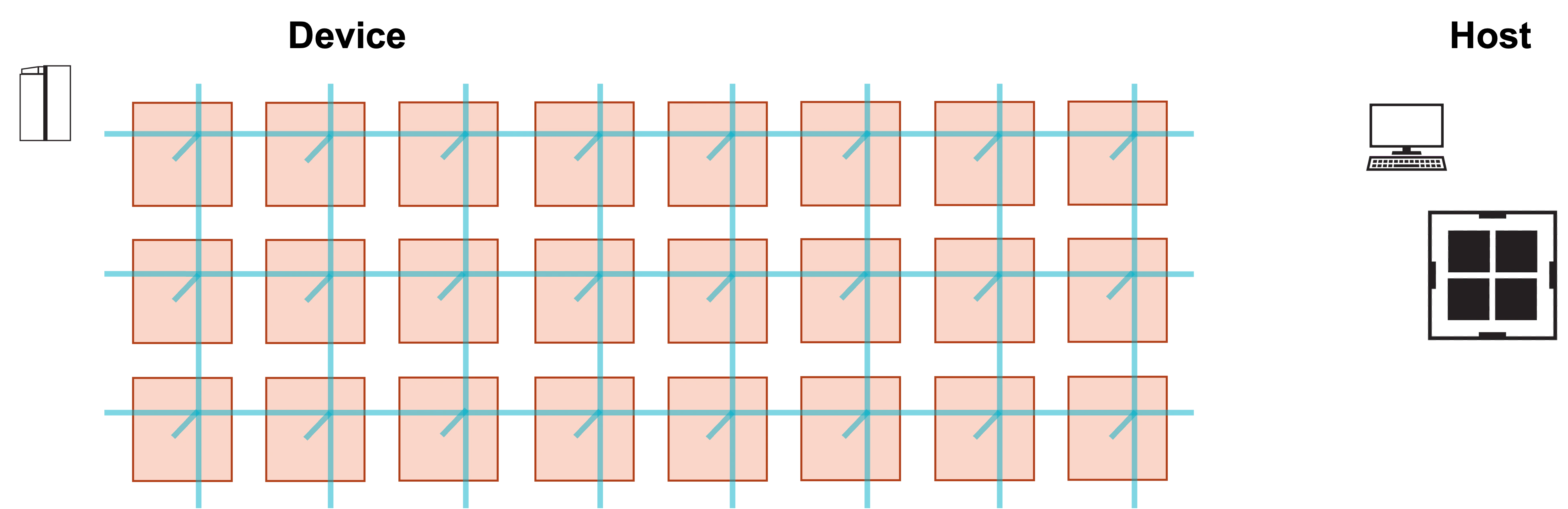
Our program will run on a single processing element (PE).
We will demonstrate the program with a simulated fabric
consisting of an 8 x 3 block of PEs.
**Warning**
The coordinates of PEs are always specified (column, row). The dimensions
of a grid of PEs are specified (width, height), or, equivalently,
(number of columns, number of rows).
 ### Problem Steps
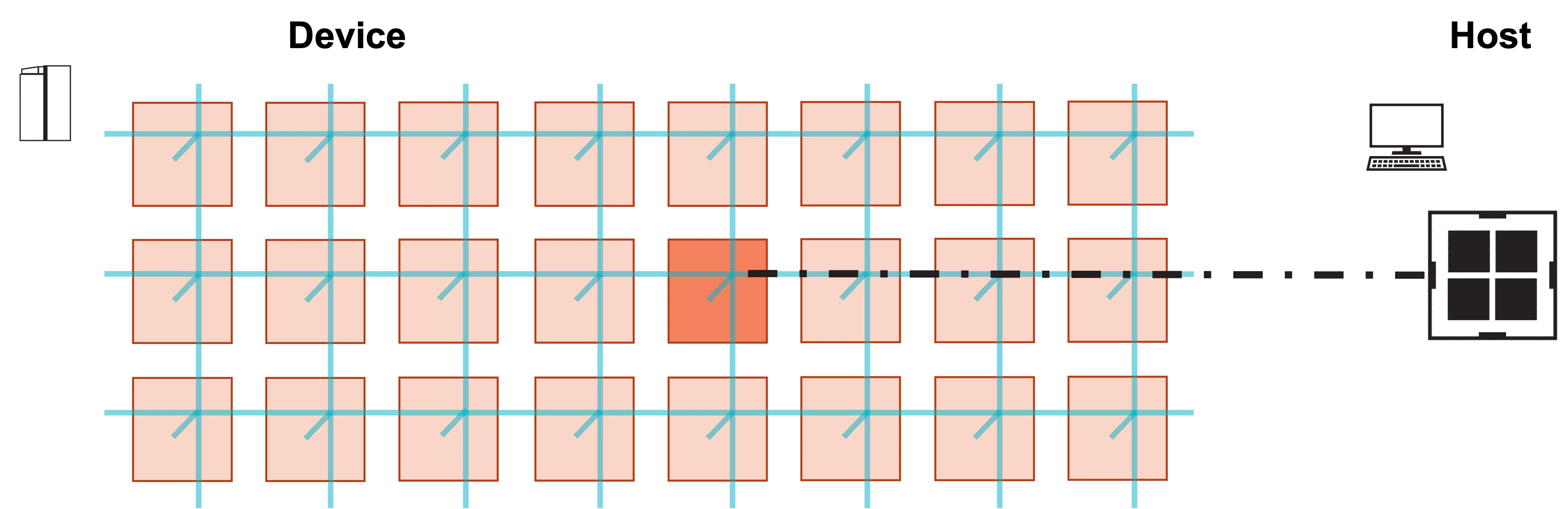
Visually, this program consists of the following steps:
**1. Host launches function on PE.**
### Problem Steps
Visually, this program consists of the following steps:
**1. Host launches function on PE.**
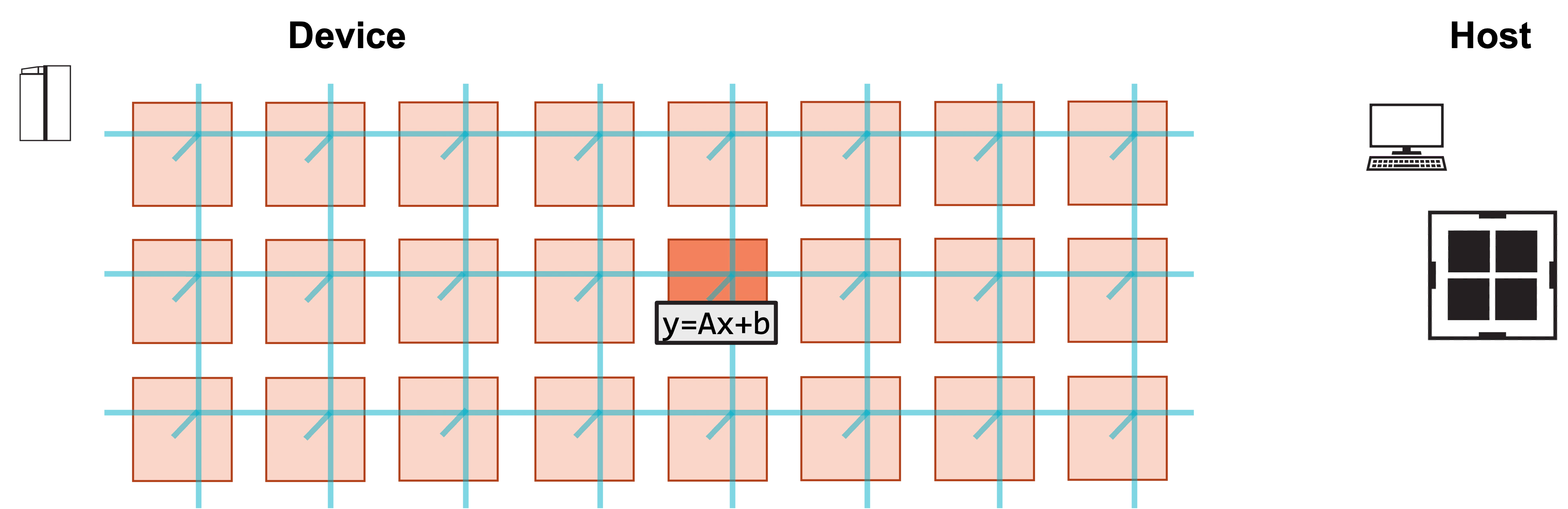
 **2. Function initializes A, x, b, and computes y.**
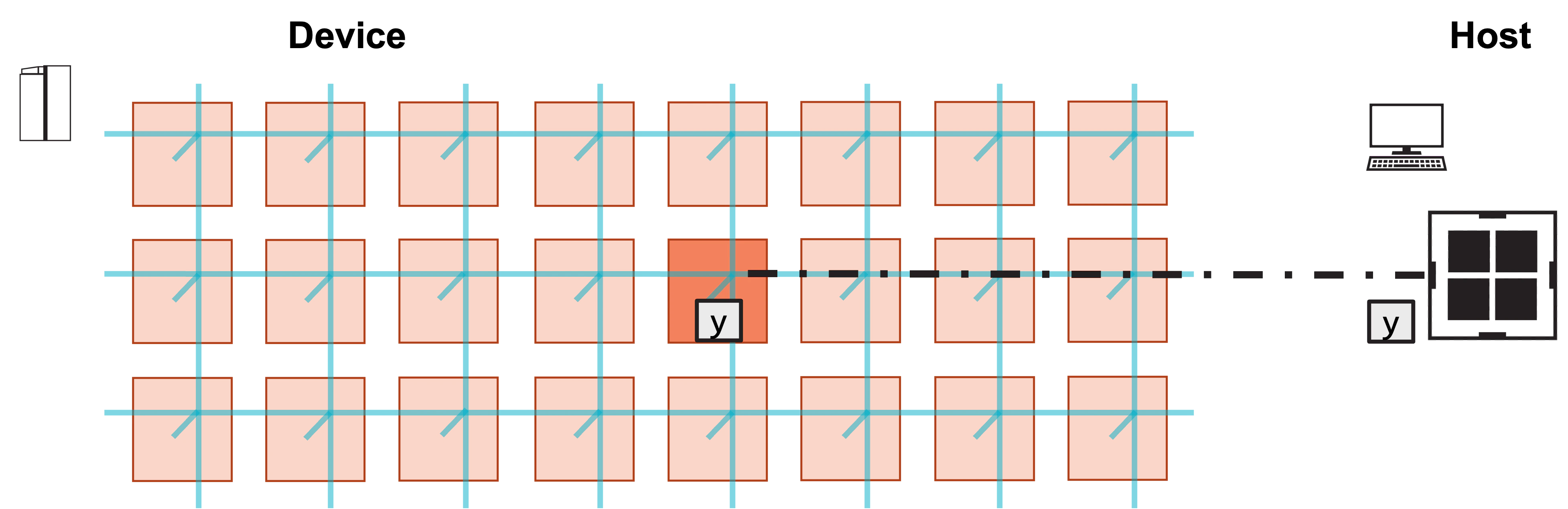
 **3. Host copies result y from device.**
 ## Writing the CSL
In the previous tutorial, we declared arrays and wrote functions
`initialize` and `gemv` to initialize and compute `y = Ax + b`.
What else do we need for our device code to form a complete program?
1. We need a top-level “layout” file, which will define the program
rectangle on which our kernel will run, and assign a
code file to the single PE in our rectangle.
2. We need to initialize the infrastructure of the memcpy library,
which allows the host to launch kernels and copy data to and
from the device.
We first walk through `layout.csl`, which defines our program layout.
We include this code below.
```csl theme={"languages":{"custom":["/languages/csl-tmlanguage.json"]}}
// Import memcpy layout module for 1 x 1 grid of PEs
// This module defines parameters passed to program on the single PE
const memcpy = @import_module("", .{ .width = 1, .height = 1 });
layout {
// Use just one 1 PE (columns=1, rows=1)
@set_rectangle(1, 1);
// The lone PE in this program should execute the code in "pe_program.csl"
// We pass memcpy parameters as a parameter to the program. Note that
// memcpy parameters are parameterized by the PE's column number.
@set_tile_code(0, 0, "pe_program.csl", .{ .memcpy_params = memcpy.get_params(0) });
// Export device symbol for array "y"
// Last argument is mutability: host can read y, but not write to it
@export_name("y", [*]f32, false);
// Export host-callable device function
@export_name("init_and_compute", fn()void);
}
```
### Initializing Memcpy Infrastructure
At the very top of this file is an `@import_module` call,
which imports the top-level memcpy infrastructure.
This module import requires width and height parameters
which correspond to the dimensions of the program rectangle.
This program only uses a single PE, so width and height are
both 1.
Module imports in CSL act like unique struct types.
Thus, the code in the CSL standard library file `memcpy/get_params`
can be used like a struct named `memcpy`.
### Defining Layout
The layout block is evaluated at compile time.
We use it to define the number of PEs used in our program
and assign code to each of those PEs.
`@set_rectangle` defines the shape of our program.
Because our program will run on a single PE,
we are compiling this program for a 1x1 rectangle of PEs.
Our single PE has coordinate (0,0), and we assign to it the code file
`pe_program.csl`, which we will explore later.
We also pass some parameters related to memcpy to this program.
The `memcpy` struct contains a function named `get_params`,
which returns some parameters for the memcpy infrastructure that each
PE’s code file must include.
This function takes as an argument the column number of the PE;
thus, for this program, the appropriate parameters are returned by
`memcpy.get_params(0)`.
### Exporting Symbols
Our host program will directly launch a device kernel, and copy back
the result `y`.
The two `@export_name` calls make the symbols visible to the host
program.
The first `@export_name` call makes the symbol named `y` visible
to the host, as a pointer to an array of type `f32`.
Its mutability is set to `false`, meaning that the host can only
read from and not write to the symbol.
The second `@export_name` call makes the symbol `init_and_compute`
visible to the host; this is the function which we will launch from
the host to compute the GEMV.
This function takes no arguments, so its type is `fn()void`.
### Adding Memcpy to the PE Program
Now, let’s take a look at `pe_program.csl`, which defines the code
that we assign to our single PE.
This program is largely the same as the preceding tutorial’s `code.csl`
file, but with some additional infrastructure related to `memcpy`.
```csl theme={"languages":{"custom":["/languages/csl-tmlanguage.json"]}}
// Struct containing parameters for memcpy layout
param memcpy_params;
// memcpy module provides infrastructure for copying data
// and launching functions from the host
const sys_mod = @import_module("", memcpy_params);
// Constants definining dimensions of our matrix
const M: i16 = 4;
const N: i16 = 6;
// 48 kB of global memory contain A, x, b, y
var A: [M*N]f32; // A is stored row major
var x: [N]f32;
var b: [M]f32;
var y: [M]f32;
// Ptr to y will be exported as symbol to host
// Ptr is const, so host can read but not write to y
const y_ptr: [*]f32 = &y;
// Initialize matrix and vectors
fn initialize() void {
// for loop with range syntax
for (@range(i16, M*N)) |idx| {
A[idx] = @as(f32, idx);
}
for (@range(i16, N)) |j| {
x[j] = 1.0;
}
// while loop with iterator syntax
var i: i16 = 0;
while (i < M) : (i += 1) {
b[i] = 2.0;
y[i] = 0.0;
}
}
// Compute gemv
fn gemv() void {
for (@range(i16, M)) |i| {
var tmp: f32 = 0.0;
for (@range(i16, N)) |j| {
tmp += A[i*N + j] * x[j];
}
y[i] = tmp + b[i];
}
}
// Call initialize and gemv functions
fn init_and_compute() void {
initialize();
gemv();
// After this function finishes, memcpy's cmd_stream must
// be unblocked on all PEs for further memcpy commands
// to execute
sys_mod.unblock_cmd_stream();
}
comptime {
// Export symbol pointing to y so it is host-readable
@export_symbol(y_ptr, "y");
// Export function so it is host-callable by RPC mechanism
@export_symbol(init_and_compute);
}
```
At the top, we declare a parameter named `memcpy_params`:
this parameter’s value is set at compile time by `@set_tile_code`
in `layout.csl`.
Next is another memcpy-related `@import_module`, this time importing
the PE-specific `` standard library file
as a struct named `sys_mod`.
Our functions `initialize` and `gemv` are identical to the previous
tutorial.
However, note one addition to `init_and_compute`.
After `gemv` finishes, we must notify the memcpy infrastructure that
additional commands from the host can proceed.
Thus, we must call `sys_mod.unblock_cmd_stream()` at the end
of our function.
The control flow of every host-callable function in a CSL program must end
with a call to `unblock_cmd_stream()`.
Everything inside of `comptime` block is evaluated at compile time.
This comptime block exports symbols so they can be advertised to the host.
In particular, `y_ptr`, which is a pointer to the array `y`,
is exported with the name `y`.
The `init_and_compute` function is also exported.
## Compiling CSL Code
We compile this code for the CS-2 simulator using:
```bash theme={"languages":{"custom":["/languages/csl-tmlanguage.json"]}}
$ cslc layout.csl --fabric-dims=8,3 --fabric-offsets=4,1 --memcpy --channels=1 -o out
```
This command will produce multiple ELF files, in a directory named `out`.
Let’s walk through several aspects of this command.
First, we specify the top level file to be compiled, in this case
`layout.csl`.
`pe_program.csl` does not have to be specified in the compilation command,
because it is included by `layout.csl`.
We also must specify the fabric dimensions of our target device,
and the fabric offset at which we place our program.
As we specified above, this tutorial is using an 8 x 3 simulated fabric,
and we place the program’s lone PE at column 4, row 1 of the fabric.
**Warning**
## Writing the CSL
In the previous tutorial, we declared arrays and wrote functions
`initialize` and `gemv` to initialize and compute `y = Ax + b`.
What else do we need for our device code to form a complete program?
1. We need a top-level “layout” file, which will define the program
rectangle on which our kernel will run, and assign a
code file to the single PE in our rectangle.
2. We need to initialize the infrastructure of the memcpy library,
which allows the host to launch kernels and copy data to and
from the device.
We first walk through `layout.csl`, which defines our program layout.
We include this code below.
```csl theme={"languages":{"custom":["/languages/csl-tmlanguage.json"]}}
// Import memcpy layout module for 1 x 1 grid of PEs
// This module defines parameters passed to program on the single PE
const memcpy = @import_module("", .{ .width = 1, .height = 1 });
layout {
// Use just one 1 PE (columns=1, rows=1)
@set_rectangle(1, 1);
// The lone PE in this program should execute the code in "pe_program.csl"
// We pass memcpy parameters as a parameter to the program. Note that
// memcpy parameters are parameterized by the PE's column number.
@set_tile_code(0, 0, "pe_program.csl", .{ .memcpy_params = memcpy.get_params(0) });
// Export device symbol for array "y"
// Last argument is mutability: host can read y, but not write to it
@export_name("y", [*]f32, false);
// Export host-callable device function
@export_name("init_and_compute", fn()void);
}
```
### Initializing Memcpy Infrastructure
At the very top of this file is an `@import_module` call,
which imports the top-level memcpy infrastructure.
This module import requires width and height parameters
which correspond to the dimensions of the program rectangle.
This program only uses a single PE, so width and height are
both 1.
Module imports in CSL act like unique struct types.
Thus, the code in the CSL standard library file `memcpy/get_params`
can be used like a struct named `memcpy`.
### Defining Layout
The layout block is evaluated at compile time.
We use it to define the number of PEs used in our program
and assign code to each of those PEs.
`@set_rectangle` defines the shape of our program.
Because our program will run on a single PE,
we are compiling this program for a 1x1 rectangle of PEs.
Our single PE has coordinate (0,0), and we assign to it the code file
`pe_program.csl`, which we will explore later.
We also pass some parameters related to memcpy to this program.
The `memcpy` struct contains a function named `get_params`,
which returns some parameters for the memcpy infrastructure that each
PE’s code file must include.
This function takes as an argument the column number of the PE;
thus, for this program, the appropriate parameters are returned by
`memcpy.get_params(0)`.
### Exporting Symbols
Our host program will directly launch a device kernel, and copy back
the result `y`.
The two `@export_name` calls make the symbols visible to the host
program.
The first `@export_name` call makes the symbol named `y` visible
to the host, as a pointer to an array of type `f32`.
Its mutability is set to `false`, meaning that the host can only
read from and not write to the symbol.
The second `@export_name` call makes the symbol `init_and_compute`
visible to the host; this is the function which we will launch from
the host to compute the GEMV.
This function takes no arguments, so its type is `fn()void`.
### Adding Memcpy to the PE Program
Now, let’s take a look at `pe_program.csl`, which defines the code
that we assign to our single PE.
This program is largely the same as the preceding tutorial’s `code.csl`
file, but with some additional infrastructure related to `memcpy`.
```csl theme={"languages":{"custom":["/languages/csl-tmlanguage.json"]}}
// Struct containing parameters for memcpy layout
param memcpy_params;
// memcpy module provides infrastructure for copying data
// and launching functions from the host
const sys_mod = @import_module("", memcpy_params);
// Constants definining dimensions of our matrix
const M: i16 = 4;
const N: i16 = 6;
// 48 kB of global memory contain A, x, b, y
var A: [M*N]f32; // A is stored row major
var x: [N]f32;
var b: [M]f32;
var y: [M]f32;
// Ptr to y will be exported as symbol to host
// Ptr is const, so host can read but not write to y
const y_ptr: [*]f32 = &y;
// Initialize matrix and vectors
fn initialize() void {
// for loop with range syntax
for (@range(i16, M*N)) |idx| {
A[idx] = @as(f32, idx);
}
for (@range(i16, N)) |j| {
x[j] = 1.0;
}
// while loop with iterator syntax
var i: i16 = 0;
while (i < M) : (i += 1) {
b[i] = 2.0;
y[i] = 0.0;
}
}
// Compute gemv
fn gemv() void {
for (@range(i16, M)) |i| {
var tmp: f32 = 0.0;
for (@range(i16, N)) |j| {
tmp += A[i*N + j] * x[j];
}
y[i] = tmp + b[i];
}
}
// Call initialize and gemv functions
fn init_and_compute() void {
initialize();
gemv();
// After this function finishes, memcpy's cmd_stream must
// be unblocked on all PEs for further memcpy commands
// to execute
sys_mod.unblock_cmd_stream();
}
comptime {
// Export symbol pointing to y so it is host-readable
@export_symbol(y_ptr, "y");
// Export function so it is host-callable by RPC mechanism
@export_symbol(init_and_compute);
}
```
At the top, we declare a parameter named `memcpy_params`:
this parameter’s value is set at compile time by `@set_tile_code`
in `layout.csl`.
Next is another memcpy-related `@import_module`, this time importing
the PE-specific `` standard library file
as a struct named `sys_mod`.
Our functions `initialize` and `gemv` are identical to the previous
tutorial.
However, note one addition to `init_and_compute`.
After `gemv` finishes, we must notify the memcpy infrastructure that
additional commands from the host can proceed.
Thus, we must call `sys_mod.unblock_cmd_stream()` at the end
of our function.
The control flow of every host-callable function in a CSL program must end
with a call to `unblock_cmd_stream()`.
Everything inside of `comptime` block is evaluated at compile time.
This comptime block exports symbols so they can be advertised to the host.
In particular, `y_ptr`, which is a pointer to the array `y`,
is exported with the name `y`.
The `init_and_compute` function is also exported.
## Compiling CSL Code
We compile this code for the CS-2 simulator using:
```bash theme={"languages":{"custom":["/languages/csl-tmlanguage.json"]}}
$ cslc layout.csl --fabric-dims=8,3 --fabric-offsets=4,1 --memcpy --channels=1 -o out
```
This command will produce multiple ELF files, in a directory named `out`.
Let’s walk through several aspects of this command.
First, we specify the top level file to be compiled, in this case
`layout.csl`.
`pe_program.csl` does not have to be specified in the compilation command,
because it is included by `layout.csl`.
We also must specify the fabric dimensions of our target device,
and the fabric offset at which we place our program.
As we specified above, this tutorial is using an 8 x 3 simulated fabric,
and we place the program’s lone PE at column 4, row 1 of the fabric.
**Warning**
Every program using memcpy **must** use a fabric offset of `4,1`,
and if compiling for a simulated fabric, must use a fabric dimension
of at least `width+7,height+1`, where `width` and `height` are
the dimensions of the program.
These additional PEs are used by memcpy to route data on and off the wafer.
Last, note that flag specifying `memcpy` and `channels`.
Every program using memcpy must include the `--memcpy` flag.
When running on a real system,
the `channels` flag determines the max throughput for transferring data
on and off the wafer.
Its value can be no larger than the height of the program rectangle
(the number of rows), and maxes out at 16.
Typically, performance improvements are minimal past 8 channels.
This program is also compatible with the CS-3 architecture.
We can specify the `--arch` flag to determine for which architecture we compile.
The default value is `--arch=wse2`,
where WSE-2 is the processor architecture used in the CS-2.
We specify the value `--arch=wse3` to compile for WSE-3,
the processor architecture used in the CS-3.
## Writing the Host Code
What does our host code need to do?
1. Import needed libraries
2. Specify paths to compiled code and instantiate runner object
3. Run device kernel `init_and_compute`
4. Copy back `y` and check result
We explain some features of our `run.py` file containing
the host code below.
```python theme={"languages":{"custom":["/languages/csl-tmlanguage.json"]}}
#!/usr/bin/env cs_python
import argparse
import numpy as np
from cerebras.sdk.runtime.sdkruntimepybind import SdkRuntime, MemcpyDataType, MemcpyOrder # pylint: disable=no-name-in-module
# Read arguments
parser = argparse.ArgumentParser()
parser.add_argument('--name', help="the test compile output dir")
parser.add_argument('--cmaddr', help="IP:port for CS system")
args = parser.parse_args()
# Matrix dimensions
M = 4
N = 6
# Construct A, x, b
A = np.arange(M*N, dtype=np.float32).reshape(M, N)
x = np.full(shape=N, fill_value=1.0, dtype=np.float32)
b = np.full(shape=M, fill_value=2.0, dtype=np.float32)
# Calculate expected y
y_expected = A@x + b
# Construct a runner using SdkRuntime
runner = SdkRuntime(args.name, cmaddr=args.cmaddr)
# Get symbol for copying y result off device
y_symbol = runner.get_id('y')
# Load and run the program
runner.load()
runner.run()
# Launch the init_and_compute function on device
runner.launch('init_and_compute', nonblock=False)
# Copy y back from device
# Arguments to memcpy_d2h:
# - y_result is array on host which will story copied-back array
# - y_symbol is symbol of device tensor to be copied
# - 0, 0, 1, 1 are (starting x-coord, starting y-coord, width, height)
# of rectangle of PEs whose data is to be copied
# - M is number of elements to be copied from each PE
y_result = np.zeros([1*1*M], dtype=np.float32)
runner.memcpy_d2h(y_result, y_symbol, 0, 0, 1, 1, M, streaming=False,
order=MemcpyOrder.ROW_MAJOR, data_type=MemcpyDataType.MEMCPY_32BIT, nonblock=False)
# Stop the program
runner.stop()
# Ensure that the result matches our expectation
np.testing.assert_allclose(y_result, y_expected, atol=0.01, rtol=0)
print("SUCCESS!")
```
### Imports
`SdkRuntime` is the library containing the functionality necessary
for loading and running the device code, as well as copying
data on and off the wafer.
Along with `SdkRuntime`, we import `MemcpyDataType` and `MemcpyOrder`,
which are enums containing types for use with memcpy calls.
We explain this in more detail below.
### Instantiating Runner
This script contains two arguments: `name` and `cmaddr`.
We use `name` to specify the directory containing the compilation output.
We will discuss `cmaddr` later, but for now, we leave it unspecified.
We instantiate a runner object using `SdkRuntime`’s constructor:
```python theme={"languages":{"custom":["/languages/csl-tmlanguage.json"]}}
runner = SdkRuntime(args.name, cmaddr=args.cmaddr)
```
Before loading, we grab a handle for later copying `y` off the device,
with the call to `runner.get_id('y')`. We then load the program onto the
device and begin running with `runner.load()` and `runner.run()`.
### Running Device Kernel
Next, we launch our device kernel `init_and_compute`:
```python theme={"languages":{"custom":["/languages/csl-tmlanguage.json"]}}
runner.launch('init_and_compute', nonblock=False)
```
The `nonblock=False` flag simply specifies that this call will wait to
return control to the host program until after the kernel has been launched.
Otherwise, this call will return control to the host immediately.
### Copying Back Result
We use a call to `memcpy_d2h` to copy the result `y` back from the device.
First, we must allocate space on the host to hold the result:
```python theme={"languages":{"custom":["/languages/csl-tmlanguage.json"]}}
y_result = np.zeros([1*1*M], dtype=np.float32)
```
Then, we copy `y` from the device into this array:
```python theme={"languages":{"custom":["/languages/csl-tmlanguage.json"]}}
runner.memcpy_d2h(y_result, y_symbol, 0, 0, 1, 1, M, streaming=False,
order=MemcpyOrder.ROW_MAJOR, data_type=MemcpyDataType.MEMCPY_32BIT, nonblock=False)
```
This call has quite a few arguments, so let’s walk through them.
The first argument is the array on the host to hold the result,
which we just allocated on the previous line.
The next argument, `y_symbol`, is the symbol on device that points
to the `y` array.
The next four arguments specify the location of the rectangle of PEs from
which to copy, which is referred to as the “region of interest” or ROI.
The first two, `0, 0`, specify that the northwest corner of the ROI
begins at PE (0, 0) within the program rectangle.
Thus, it begins at the northwesternmost corner of the program rectangle.
The next two specify the width and height of the ROI.
We only copy the result back from a single PE, so the width and height
of our ROI is simply `1, 1`.
**Warning**
Note that we specify the ROI based on its position in the
program rectangle, NOT on its position in the device fabric.
The next argument specifies how many elements to copy back from each
PE in the ROI.
In this case, the result `y` has `M` elements.
The next four arguments are all keyword arguments specifying certain attributes
of this copy operation.
We’ll defer discussion of the `streaming` keyword to a future tutorial.
Note, however, that any copy between host-to-device which copies to or from
a device symbol uses `streaming=False`.
The `order` keyword specifies the layout of the data copied back to
`y_result`.
`memcpy_d2h` always copies into a 1D array on the host.
`ROW_MAJOR` specifies that the data is ordered by (ROI height, ROI width,
elements per PE).
Thus, the data copied back from each PE is contiguous in the result array.
`COL_MAJOR`, on the other hand, specifies that the data is ordered by
(elements per PE, ROI width, ROI height).
Thus, the result array will contain the 0th element from each PE,
followed by the 1st element from each PE, and so on.
For this tutorial, because we are copying back from a single PE, `ROW_MAJOR`
and `COL_MAJOR` are identical.
In general, for copies over larger fabrics, `COL_MAJOR` is more
performant than `ROW_MAJOR`.
The `data_type` keyword specifies the width of the data copied back.
We are copying back single-precision floating point numbers,
so the data width is 32 bit.
`nonblock=False` specifies that this call will not return control
to the host until the copy into `y_result` has finished.
**Note**
How does the program ensure that this copy does not happen until
`init_and_compute` has finished?
The memcpy infrastructure in the CSL program can only execute one
command at a time.
After a device kernel is launched, `unblock_cmd_stream` must be called
before a `memcpy_d2h` can proceed.
The call to `unblock_cmd_stream` at the end of the `init_and_compute`
function in `pe_program.csl` guarantees that `init_and_compute`
finishes before the `memcpy_d2h` occurs.
### Finishing Program and Checking Result
The call to `runner.stop()` stops the execution of the program on device.
We then check that the `y_result` we copied back from the device matches
the `y_expected` we pre-computed on the host.
If they indeed match, we print a `SUCCESS` message.
## Running the Program
We can run the program using `cs_python`,
which wraps the Cerebras-provided Python instance for executing host code.
```bash theme={"languages":{"custom":["/languages/csl-tmlanguage.json"]}}
$ cs_python run.py --name out
```
You should see a `SUCCESS!` message at the end of execution.
You have successfully run your first program!
## Moving from Simulator to System
We’ve compiled and run this program using the fabric simulator,
but with a few modest changes, we can also compile and run on a real
Cerebras system.
First, we must modify the compile command to replace the `fabric-dims`
with the actual dimensions of our target fabric.
Most CS-3s will have a fabric dimension of 762 x 1172,
so our compile command becomes:
```bash theme={"languages":{"custom":["/languages/csl-tmlanguage.json"]}}
$ cslc layout.csl --arch=wse3 --fabric-dims=762,1172 --fabric-offsets=4,1 --memcpy --channels=1 -o out
```
This program is also compatible with the CS-2, which has a fabric dimension
of 757 x 996. Compiling for the CS-2 requires specifying the WSE-2 architecture:
```bash theme={"languages":{"custom":["/languages/csl-tmlanguage.json"]}}
$ cslc layout.csl --arch=wse2 --fabric-dims=757,996 --fabric-offsets=4,1 --memcpy --channels=1 -o out
```
The Cerebras system is a network attached accelerator.
When targeting a real system for running a program,
we must know its IP address.
This is the purpose of the `SdkRuntime` constructor’s
`cmaddr` keyword argument.
If the IP address is stored in an environment variable
named `$CS_IP_ADDR`, then you can run on the system with:
```bash theme={"languages":{"custom":["/languages/csl-tmlanguage.json"]}}
$ cs_python run.py --name out --cmaddr $CS_IP_ADDR:9000
```
We use port 9000 to connect to the system and launch our program.
**Note**
The compile and run commands above are used when running the SDK directly from a host node
connected to the CS system. If using a Wafer-Scale Cluster in appliance mode,
see [Running SDK on a Wafer-Scale Cluster](/appliance-mode).
## Exercises
We initialize `A`, `x`, and `b` on the host to the same values
we initialize them on the device, manually.
Instead of initializing them like this, we could also use `memcpy_d2h`
calls to copy them from the device just as we do with `y`.
Create exported symbols for `A`, `x`, and `b`, and use them to
copy these arrays back to the host and compute an expected result for `y`.
Note that `A`, `x`, and `b` are not initialized until the
`init_and_compute` device kernel executes.
We can also break up `init_and_compute` into two device kernel calls.
Create separate device kernel calls for `initialize` and `gemv`
which are launched separately on the host,
and copy back `A`, `x`, and `b` after you launch `initialize`
but before you launch `gemv`.
## Next
In the next tutorial, we expand this program to use
data structure descriptors (DSDs), a core language feature of CSL.