> ## Documentation Index
> Fetch the complete documentation index at: https://sdk.cerebras.ai/llms.txt
> Use this file to discover all available pages before exploring further.
# A Conceptual View
> Learn how the Wafer-Scale Engine architecture works, how processing elements communicate, and how the host and device interact.
The Cerebras Wafer-Scale Engine (WSE) is a wafer-parallel compute accelerator,
containing hundreds of thousands of independent processing elements (PEs).
The PEs are interconnected by communication links into a two-dimensional rectangular mesh on one single silicon wafer.
Each PE has its own memory (used by it and no other) and its own program counter.
It has its own executable code in its memory.
32-bit messages, called wavelets, can be sent to or received by neighboring PEs in a single clock cycle.
The PE also has dataflow control characteristics.
An instruction can terminate the currently running thread (called a task), at which time,
hardware selects a new task from among the set of tasks that constitute the PE’s code.
It selects a runnable task, one that has been *activated*
(and *unblocked*; we will describe this in more detail later).
Incoming wavelets travel along a virtual channel, called a color.
All colors transfer data on a single physical channel.
The congestion of one color does not block the traffic of another color.
For each color used for incoming wavelets, there may be a task that is activated by its arrival.
The Cerebras System (CS) is a self-contained rack-mounted system containing
packaging, power supply, cooling and I/O for a single WSE.
The CS communicates via parallel 100 Gigabit ethernet connections to a host CPU cluster.
Throughout this documentation, the CS is referred to as the “device,”
the host CPU cluster as the “host,”
and the ethernet connections connecting the two as “host I/O”.
The SDK provides mechanisms for using host I/O to move data between host and device
or launch functions on the device.
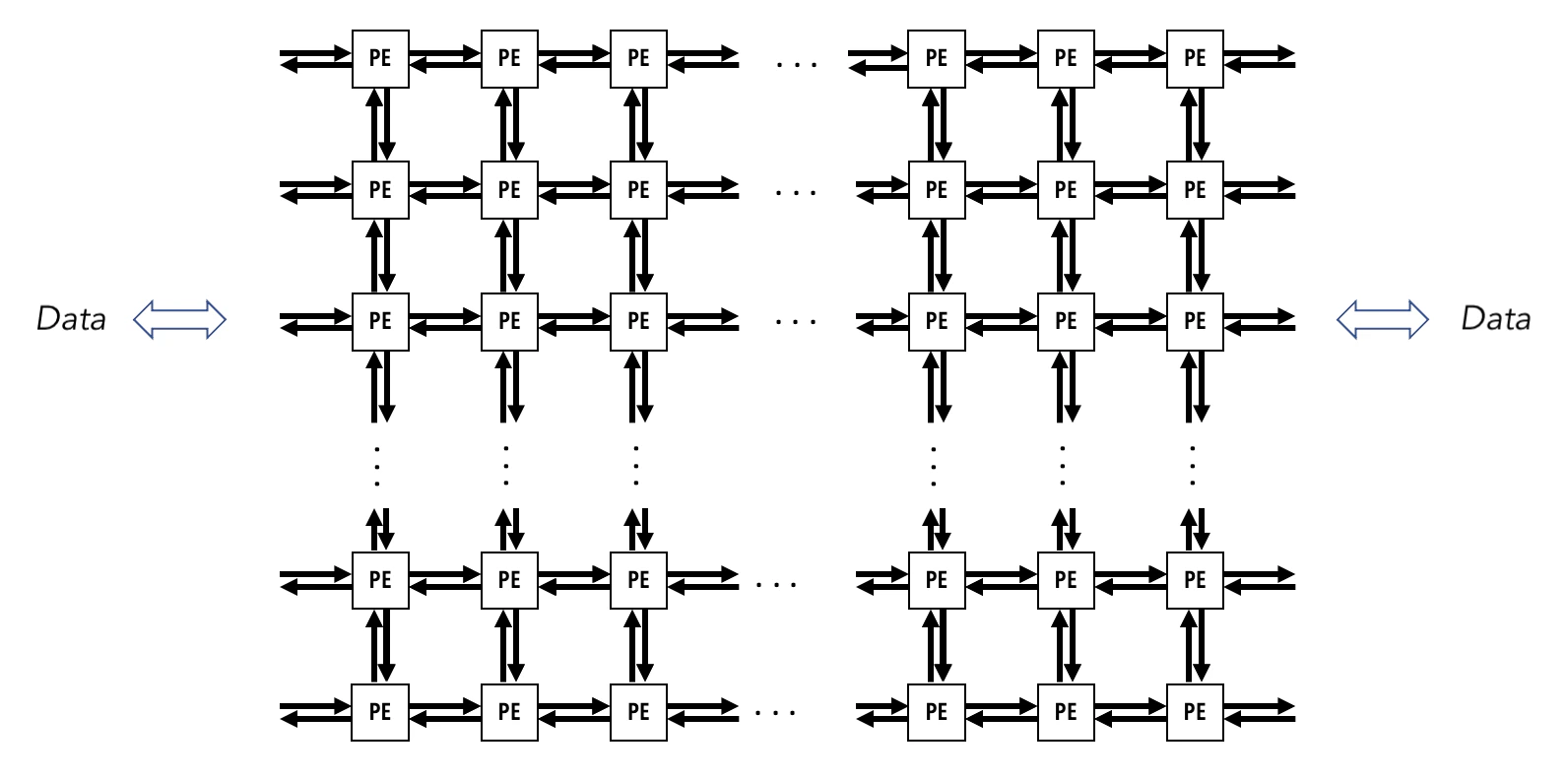
The below figure gives a visual representation of the mesh of PEs that make up the WSE,
and its connections to the outside world.
Data is streamed onto the device via host I/O, and enters the WSE through a series
of links along its edges.
The programming model of the SDK abstracts away the details of these links,
and allows the programmer to copy data from the host to arbitrary PEs on the device.
 ## A Processing Element (PE)
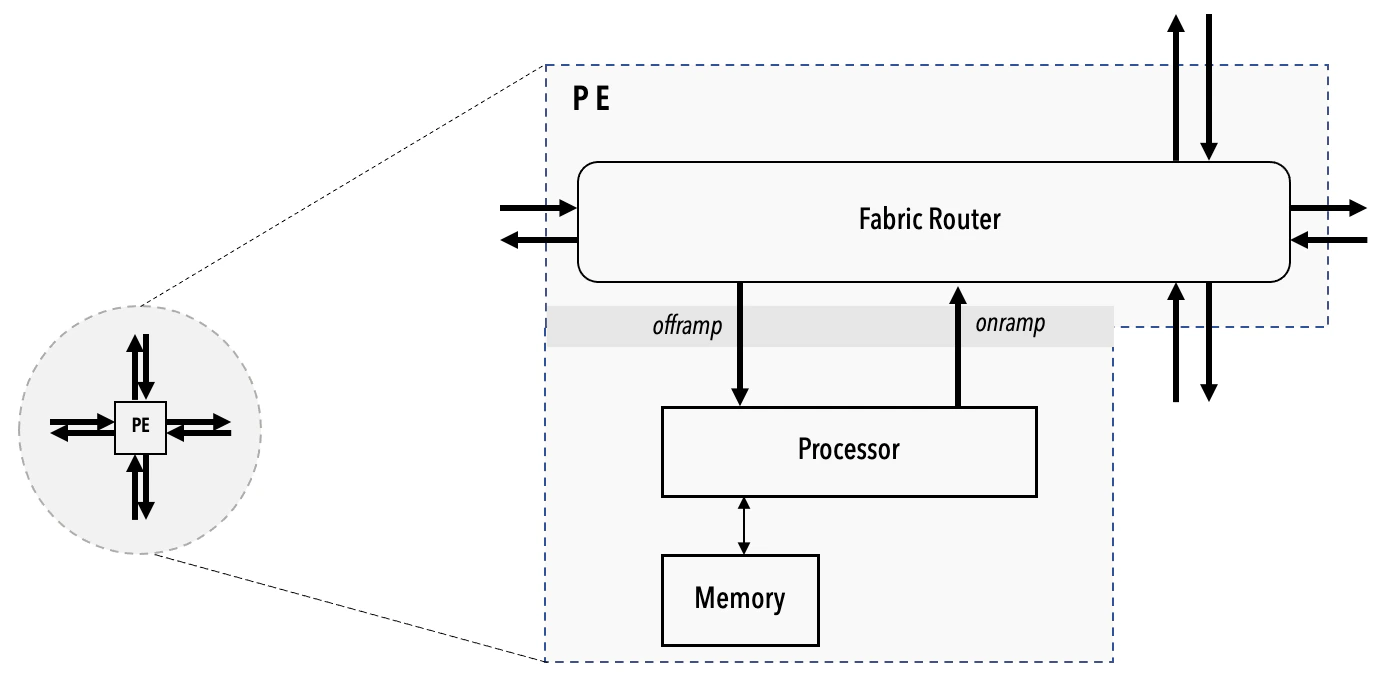
A PE contains three key elements:
1. A processor.
Also referred as a compute engine (CE).
2. A router.
The router of a PE is directly connected via bidirectional links to its own CE
and to the routers of the four nearest neighboring PEs in the mesh.
The link to its own CE is called the RAMP, and the links to the four neighboring
PEs are referred to by their cardinal directions.
The router is the only communication device the PEs use to send and receive data.
3. The local PE memory.
All of the PE’s data and code are stored within this memory.
Neither the CE nor the local memory of a PE is directly accessible by other PEs.
## A Processing Element (PE)
A PE contains three key elements:
1. A processor.
Also referred as a compute engine (CE).
2. A router.
The router of a PE is directly connected via bidirectional links to its own CE
and to the routers of the four nearest neighboring PEs in the mesh.
The link to its own CE is called the RAMP, and the links to the four neighboring
PEs are referred to by their cardinal directions.
The router is the only communication device the PEs use to send and receive data.
3. The local PE memory.
All of the PE’s data and code are stored within this memory.
Neither the CE nor the local memory of a PE is directly accessible by other PEs.
 ## The Programming Model
To develop code for the WSE, you write device code in the Cerebras Software Language (CSL),
and host code in Python.
You then compile the device code, and run your program on either
the **Cerebras fabric simulator**, or the actual network-attached device.
The host code is responsible for copying data to and from the device,
and launching discrete programs referred to as kernels.
CSL gives you full control of the WSE.
To understand how to structure device code in CSL,
we need to introduce a few key concepts first.
### Programs and Tasks
A CSL program consists of one or more subprograms.
Some of these are callable functions, and some are tasks.
A task is a procedure that cannot be called from other code.
Rather, tasks are started by the PE hardware, and run until they complete,
at which point, the hardware chooses a new task to run.
Tasks cannot be *called*, only *activated*. They cannot return values.
For example, in this code snippet, `main_task` will set the value
of the global variable `result` to `5.0` when it is activated and runs.
In CSL this task is represented as:
```csl theme={"languages":{"custom":["/languages/csl-tmlanguage.json"]}}
var result: f32 = 0.0;
task main_task() void {
result = 5.0;
}
```
Each task is bound to a *task ID*, which serves as a handle
for identifying the task.
### Task IDs and Types of Tasks
The term “task identifier” or “task ID” is used to refer to a numerical value that can be
associated with a task. A task ID is a number from 0 to 63.
Within this range there are two properties that further distinguish a task ID:
*routable* and *activatable*.
There exist three types of tasks, each with an associated task ID handle type:
* The first are *data tasks*.
These are associated with a `data_task_id`, which on the WSE-2 architecture is created
from a routable identifier associated with a color.
On the WSE-3 architecture, a `data_task_id` is created from an *input queue*, which
also must be associated with a color.
An input queue is a hardware buffer where data is temporarily
stored before entering the compute engine (CE) of a PE.
* The second are *local tasks*. These are associated with a `local_task_id`, which is created
from an activatable identifier.
* The third are *control tasks*. These are associated with a `control_task_id`,
which can be created from any identifier, including those that are neither routable nor
activatable.
Both data tasks and control tasks are a type of wavelet-triggered task, or WTT:
their activation is triggered by the arrival of a wavelet.
In this introduction, we will explore what it means for a task ID to be routable
or activatable, and the usage of data tasks and local tasks.
**Note**
## The Programming Model
To develop code for the WSE, you write device code in the Cerebras Software Language (CSL),
and host code in Python.
You then compile the device code, and run your program on either
the **Cerebras fabric simulator**, or the actual network-attached device.
The host code is responsible for copying data to and from the device,
and launching discrete programs referred to as kernels.
CSL gives you full control of the WSE.
To understand how to structure device code in CSL,
we need to introduce a few key concepts first.
### Programs and Tasks
A CSL program consists of one or more subprograms.
Some of these are callable functions, and some are tasks.
A task is a procedure that cannot be called from other code.
Rather, tasks are started by the PE hardware, and run until they complete,
at which point, the hardware chooses a new task to run.
Tasks cannot be *called*, only *activated*. They cannot return values.
For example, in this code snippet, `main_task` will set the value
of the global variable `result` to `5.0` when it is activated and runs.
In CSL this task is represented as:
```csl theme={"languages":{"custom":["/languages/csl-tmlanguage.json"]}}
var result: f32 = 0.0;
task main_task() void {
result = 5.0;
}
```
Each task is bound to a *task ID*, which serves as a handle
for identifying the task.
### Task IDs and Types of Tasks
The term “task identifier” or “task ID” is used to refer to a numerical value that can be
associated with a task. A task ID is a number from 0 to 63.
Within this range there are two properties that further distinguish a task ID:
*routable* and *activatable*.
There exist three types of tasks, each with an associated task ID handle type:
* The first are *data tasks*.
These are associated with a `data_task_id`, which on the WSE-2 architecture is created
from a routable identifier associated with a color.
On the WSE-3 architecture, a `data_task_id` is created from an *input queue*, which
also must be associated with a color.
An input queue is a hardware buffer where data is temporarily
stored before entering the compute engine (CE) of a PE.
* The second are *local tasks*. These are associated with a `local_task_id`, which is created
from an activatable identifier.
* The third are *control tasks*. These are associated with a `control_task_id`,
which can be created from any identifier, including those that are neither routable nor
activatable.
Both data tasks and control tasks are a type of wavelet-triggered task, or WTT:
their activation is triggered by the arrival of a wavelet.
In this introduction, we will explore what it means for a task ID to be routable
or activatable, and the usage of data tasks and local tasks.
**Note**
On WSE-2, task IDs 0 to 23 are the routable task IDs,
as data tasks IDs are created from one of the 24 routable colors (see below).
On WSE-3, task IDs 0 to 7 are the routable task IDs,
as data task IDs are created from one of the 8 input queues.
### Communication
The WSE provides efficient, fine-grained communication between PEs.
A PE must be able to quickly, within a few cycles, respond to the
arrival of a wavelet, update its internal state, and send out wavelets.
There exist 24 virtual communication channels used by the hardware
to pass wavelets between PEs.
We refer to these channels as *routable colors*, or simply *colors*,
and identify them by an ID between 0 and 23.
Each wavelet has a 5-bit tag that encodes its color.
This color determines both the wavelet’s routing through the fabric
and what task, if any, will consume the wavelet when received.
(On WSE-3, the consuming task is determined by which input queue the color
is bound to; see [`@initialize_queue`](/csl/language/builtins#@initialize_queue).)
In the below code block, our task now takes an argument, named `wavelet_data`.
This task is an example of a *data task*.
The builtin CSL function `@bind_data_task` creates a binding between
a task ID associated with the color
of the incoming wavelet and the task `main_task`.
On WSE-2, this task ID is the same as the color ID:
it takes on a value between 0 and 23.
On WSE-3, this task ID is instead the ID of an input queue which is bound to the color:
it takes on a value between 0 and 7.
When a red wavelet arrives, the task `main_task` is *activated*,
which allows it to be selected by the task picker.
The red wavelet sits in a buffer until the task picker
selects the associated task `main_task`,
at which point the wavelet is moved into a register so that the task
can get instant access to that data.
Syntactically, the wavelet’s data is an argument of the task.
We also call `main_task` a *wavelet-triggered task*,
since it is activated by the arrival of a wavelet.
Note that the `@bind_data_task` operation occurs within a
`comptime` block: everything in a `comptime` block
is evaluated at compile-time.
```csl theme={"languages":{"custom":["/languages/csl-tmlanguage.json"]}}
// 7 is the ID of a color with some defined data routing
const red: color = @get_color(7);
// On WSE-3, 2 is the ID of an input queue which will
// be bound to our data task.
const iq: input_queue = @get_input_queue(2);
// For WSE-2, the ID for this task is created from a color.
// For WSE-3, the ID for this task is created from an input queue.
const red_task_id: data_task_id =
if (@is_arch("wse3")) @get_data_task_id(iq)
else @get_data_task_id(red);
var result: f32 = 0.0;
task main_task(wavelet_data: f32) {
result = wavelet_data;
}
comptime {
@bind_data_task(main_task, red_task_id);
// For WSE-3, input queue to which our data task is bound
// must be bound to color red.
if (@is_arch("wse3")) @initialize_queue(iq, .{ .color = red });
}
```
**Note**
Colors can also be used in a manner such that wavelets arriving
along the associated virtual communication channel do *not* activate
a task, but are received by a construct known as a *fabric DSD*.
We will explore this usage in the coming tutorials.
### Task Activation and Control Flow
As we saw above, a task will become available for selection
by the task picker when its associated task ID is activated.
The task in the above block was a data task bound to a `data_task_id`,
associated with a color which defines a route taken by wavelets
tagged with that color.
Additionally, we can create tasks which do not take wavelets as arguments,
and instead are explicitly activated by other tasks or functions.
We call these tasks local tasks, and the associated task ID type
is `local_task_ID`.
On WSE-2, we can create a `local_task_ID` from the range of task IDs
0 to 30. These IDs are the *activatable* IDs.
On WSE-3, we can create a `local_task_ID` from the range of task IDs
8 to 30.
In the below example, `main_task` activates the task ID `foo_task_id`.
This task ID is bound to `foo_task`, and so activating `foo_task_id`
will cause `foo_task` to execute next.
```csl theme={"languages":{"custom":["/languages/csl-tmlanguage.json"]}}
const red: color = @get_color(7);
const iq: input_queue = @get_input_queue(2); // Used only on WSE-3
const red_task_id: data_task_id =
if (@is_arch("wse3")) @get_data_task_id(iq)
else @get_data_task_id(red);
const foo_task_id: local_task_id = @get_local_task_id(8);
var result: f32 = 0.0;
var sum: f32 = 0.0;
task main_task(wavelet_data: f32) {
result = wavelet_data;
@activate(foo_task_id);
}
task foo_task() {
sum += result;
}
comptime {
@bind_data_task(main_task, red_task_id);
@bind_local_task(foo_task, foo_task_id);
if (@is_arch("wse3")) @initialize_queue(iq, .{ .color = red });
}
```
### Blocking and Unblocking
We can additionally *block* a task ID to provide further control over task execution.
A task must be unblocked and activated for it be scheduled by the task picker.
If a task is activated while blocked, it will not run until it has become unblocked.
By default, all IDs are unblocked and inactive.
In the below example, we introduce one additional task, `bar_task`.
We block the ID of this task at compile time, with `@block(bar_task_id)`.
When `main_task` executes, it activates both `foo_task_id` and `bar_task_id`.
However, because `bar_task_id` is blocked, we guarantee that `foo_task`
executes first. When `foo_task` executes, it unblocks `bar_task_id`,
allowing `bar_task` to begin execution once `foo_task` finishes.
If `bar_task_id` were not blocked at compile time, then the
execution of `foo_task` and `bar_task` could occur in any order.
```csl theme={"languages":{"custom":["/languages/csl-tmlanguage.json"]}}
const red: color = @get_color(7);
const iq: input_queue = @get_input_queue(2); // Used only on WSE-3
const red_task_id: data_task_id =
if (@is_arch("wse3")) @get_data_task_id(iq)
else @get_data_task_id(red);
const foo_task_id: local_task_id = @get_local_task_id(8);
const bar_task_id: local_task_id = @get_local_task_id(9);
var result: f32 = 0.0;
var sum: f32 = 0.0;
task main_task(wavelet_data: f32) {
result = wavelet_data;
@activate(foo_task_id);
@activate(bar_task_id);
}
task foo_task() {
sum += result;
@unblock(bar_task_id);
}
task bar_task() {
sum *= 2.0;
}
comptime {
@block(bar_task_id);
@bind_data_task(main_task, red_task_id);
@bind_local_task(foo_task, foo_task_id);
@bind_local_task(bar_task, bar_task_id);
if (@is_arch("wse3")) @initialize_queue(iq, .{ .color = red });
}
```
### Layout
Layout blocks are how you connect up the multiple PEs in your program rectangle
in a way your computation requires. For example, see the following 2-PE rectangle:
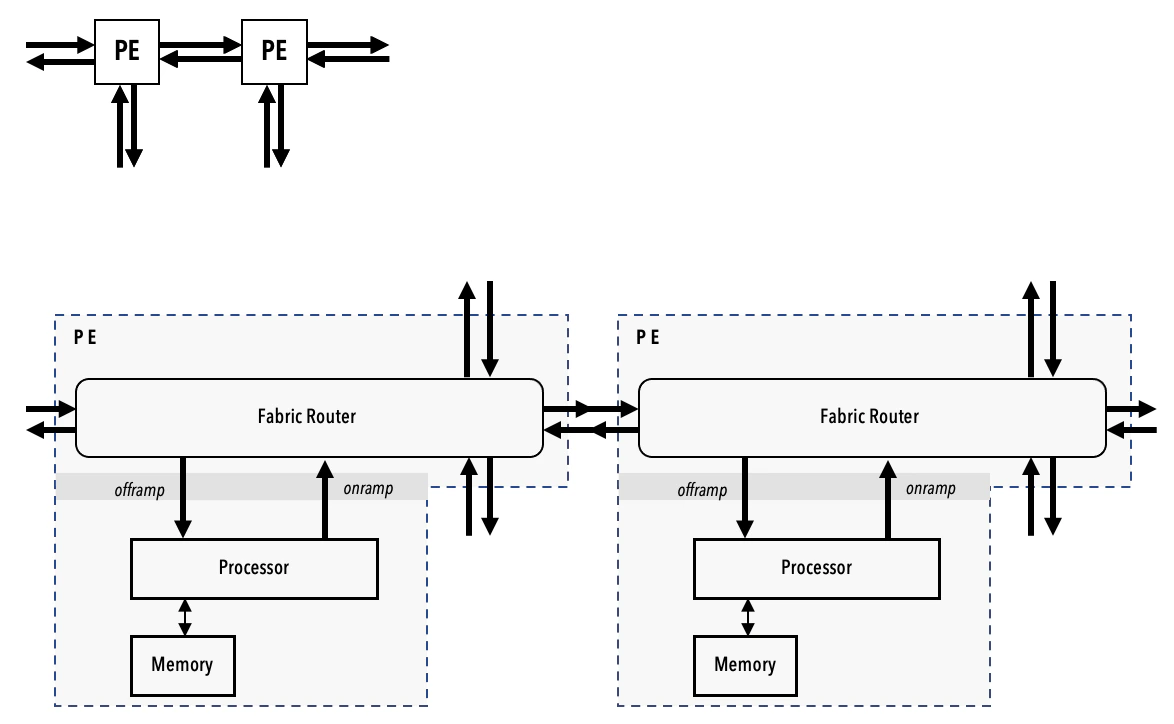 The diagram shows only one of the many ways you can interconnect the two PEs.
You connect a PE to another PE by specifying routes for colors.
Using CSL you can define the specific colors and routes by which your rectangle is stitched up.
This configuration of colors and routes forms an essential aspect of your computation,
transforming the wavelets as they enter and pass through your rectangle.
See below an example of `layout` block showing a layout of two PEs in a single row:
```csl theme={"languages":{"custom":["/languages/csl-tmlanguage.json"]}}
// layout.csl
// Top-level program source
const main_color: color = @get_color(0);
layout {
@set_rectangle(2, 1); // A row containing two PEs.
@set_tile_code(0, 0, "send.csl", .{ .send_color = main_color });
@set_tile_code(1, 0, "recv.csl", .{ .recv_color = main_color });
const send_route = .{ .rx = .{ RAMP }, .tx = .{ EAST } };
const recv_route = .{ .rx = .{ WEST }, .tx = .{ RAMP } };
@set_color_config(0, 0, main_color, send_route);
@set_color_config(1, 0, main_color, recv_route);
}
```
The `@set_tile_code()` builtin CSL function is used to specify the `.csl` file
containing the program for the individual PE within the program rectangle
denoted by the indices in the first two parameters of the function.
For example, the program `send.csl` contains the task description
that only the PE at the coordinate (0, 0) will perform.
**Note**
The diagram shows only one of the many ways you can interconnect the two PEs.
You connect a PE to another PE by specifying routes for colors.
Using CSL you can define the specific colors and routes by which your rectangle is stitched up.
This configuration of colors and routes forms an essential aspect of your computation,
transforming the wavelets as they enter and pass through your rectangle.
See below an example of `layout` block showing a layout of two PEs in a single row:
```csl theme={"languages":{"custom":["/languages/csl-tmlanguage.json"]}}
// layout.csl
// Top-level program source
const main_color: color = @get_color(0);
layout {
@set_rectangle(2, 1); // A row containing two PEs.
@set_tile_code(0, 0, "send.csl", .{ .send_color = main_color });
@set_tile_code(1, 0, "recv.csl", .{ .recv_color = main_color });
const send_route = .{ .rx = .{ RAMP }, .tx = .{ EAST } };
const recv_route = .{ .rx = .{ WEST }, .tx = .{ RAMP } };
@set_color_config(0, 0, main_color, send_route);
@set_color_config(1, 0, main_color, recv_route);
}
```
The `@set_tile_code()` builtin CSL function is used to specify the `.csl` file
containing the program for the individual PE within the program rectangle
denoted by the indices in the first two parameters of the function.
For example, the program `send.csl` contains the task description
that only the PE at the coordinate (0, 0) will perform.
**Note**
Each user program can define only one layout, specifying a rectangle of active PEs
and a code file assigned to each PE. This layout must be defined at compile time,
and a user program cannot define multiple layouts.
Hence, zero or multiple `@set_rectangle()` calls are illegal.
Additionally, the built-in `@set_tile_code()` must be called after `@set_rectangle()`.
For example, if your rectangle contains five PEs, then you can configure each PE
with a different program by having five `@set_tile_code()` calls after a single
`@set_rectangle()`,
with each `@set_tile_code()` function call specified with a separate `.csl` file.
The `@set_color_config` calls assign the routing associated with `main_color` for each PE,
from the perspective of the PE’s router.
For instance, the router of PE (0, 0) will receive wavelets along color `main_color`
from the `RAMP`, which connects the router to the CE.
It will then transmit wavelets to the `EAST`, where it will be received by the router
of the neighboring PE.
## Next Steps
Now that we’ve introduced a high-level overview of the architecture
and the programming model of CSL,
continue on to [Tutorials](/csl/tutorials) for step-by-step walkthroughs
on writing, compiling, and running complete programs with the Cerebras SDK.